DMVPN Configuration:
DMVPN stands for Dynamic Multipoint VPN and it is an effective solution for dynamic secure overlay networks. In short, DMVPN Configuration is combination of the following technologies: [boxads]
1) Multipoint GRE (mGRE)
2) Next-Hop Resolution Protocol (NHRP)
4) Dynamic Routing Protocol (EIGRP, RIP, OSPF, BGP)
3) Dynamic IPsec encryption
5) Cisco Express Forwarding (CEF)
Assuming that reader has a general understanding of what DMVPN is and a solid understanding of IPsec/CEF, we are going to describe the role and function of each component in details. In this post we are going to illustrate two major phases of DMVPN evolution:
1) Phase 1 – Hub and Spoke (mGRE hub, p2p GRE spokes)
2) Phase 2 – Hub and Spoke with Spoke-to-Spoke tunnels (mGRE everywhere)
As for DMVPN Phase 3 – “Scalable Infrastructure”, a separate post is required to cover the subject. This is due to the significant changes made to NHRP resolution logic (NHRP redirects and shortcuts), which are better being illustrated when a reader has good understanding of first two phases. However, some hints about Phase 3 will be also provided in this post.
You may follow bellow professor jaya chandran DMVPN configuration video tutorial, for learning better.
[bodylink]
Let us start with the most basic building component of DMVPN Configuration – multipoint GRE tunnel. Classic GRE tunnel is point-to-point, but mGRE generalizes this idea by allowing a tunnel to have “multiple” destinations.
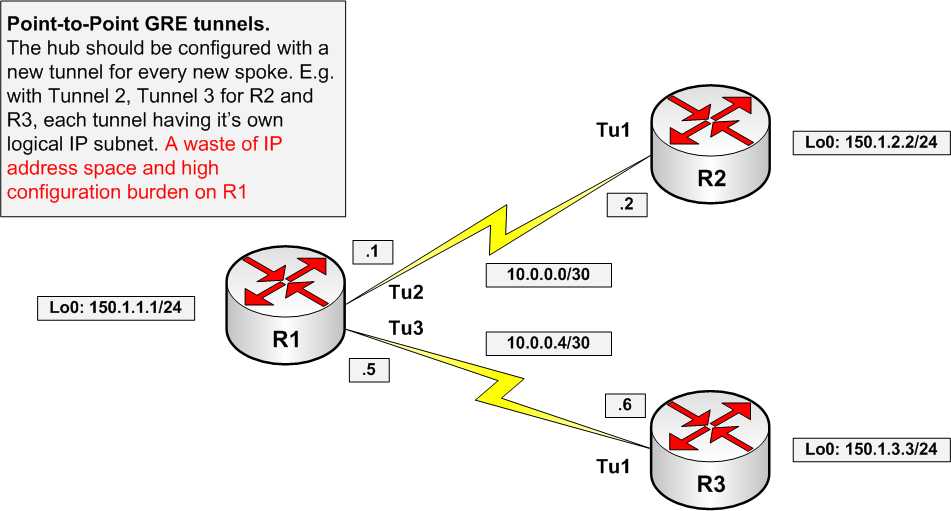
This may seem natural if the tunnel destination address is multicast (e.g. 239.1.1.1). The tunnel could be used to effectively distribute the same information (e.g. video stream) to multiple destinations on top of a multicast-enabled network. Actually, this is how mGRE is used for Multicast VPN implementation in Cisco IOS. However, if tunnel endpoints need to exchange unicast packets, special “glue” is needed to map tunnel IP addresses to “physical” or “real” IP addresses, used by endpoint routers. As we’ll see later, this glue is called NHRP.