
BGP next hop self configuration example

BGP next hop self configuration example:

[boxads]Today i will discuss bgp next hop self configuration example in cisco router. When any router receive BGP route from eBGP  source & forward it any iBGP peer, then BGP normally pass directly connected next hop ip address.  To overcome this issue, we use next hop self command in BGP section at the entry point router which router is directly connected to eBGP peer.

neighbor {ip-addr | group-name } next-hop-self

Let’s take an example.

BGP next hop self configuration example Diagram:
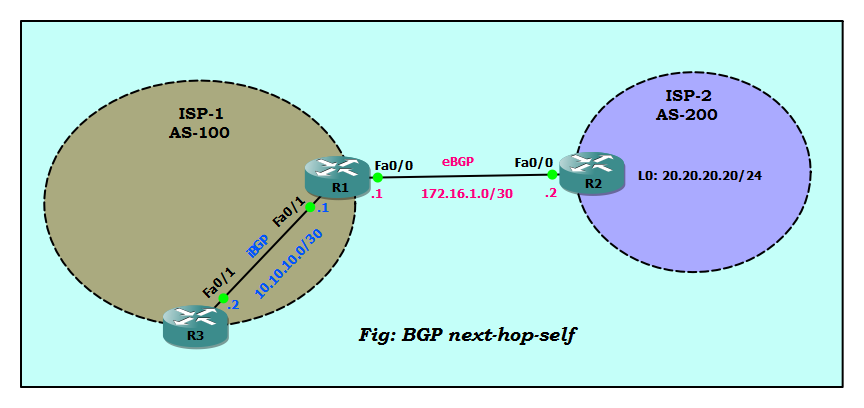
BGP next hop self configuration example

In this diagram we look Two ISP connected via eBGP peer & ISP-1 has a internal iBGP peer. Here R1 & R3 use 10.10.10.0/30 network ip, R1 & R2 use 172.16.1.0/30 network ip. Also test purpose we add a loopback ip in R2 router that is 20.20.20.20/24. When ISP-2 Router R2 advertise its network 20.20.20.0/24, next hop ip address will be 172.16.1.2 (its fa0/0 interface of R2 router). ISP-1 Router R1 advertise this network to iBGP peer router R3 with the same 172.16.1.2 next hop attribute. Let’s configure those routers, but won’t change next hop attribute for now.
Read more

BGP Multihoming with Two Different ISP

BGP Multihoming:

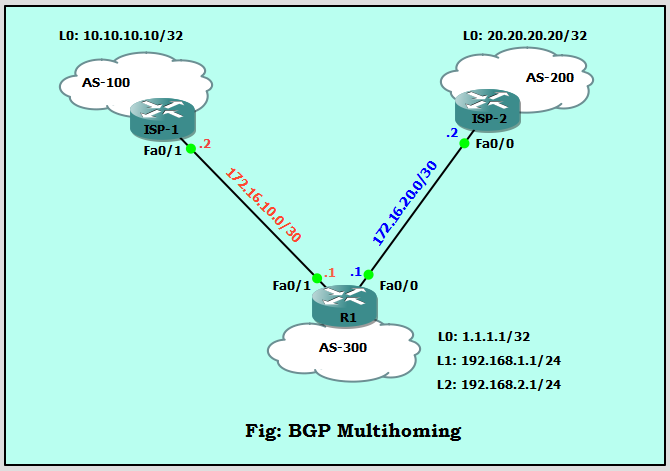
[boxads]Today i will discuss how to configure BGP Multihoming with Two Different Service Providers environment. When you connect your network to two different Internet service providers (ISPs), it is called multihoming. Multihoming provides redundancy and network optimization. It selects the ISP which offers the best path to a resource. So let’s follow our diagram:

BGP Multihoming
BGP Multihoming

Here Router R1 upstream are connected to two ISP’s. one is ISP-1 and AS is 100, another is ISP-2 and it’s AS is 200. Now let’s go our BGP Multihoming configuration part.

Read more

eBGP load balancing with single-homed BGP environment

eBGP load balancing :

[boxads]Today i will discuss how to configure eBGP load balancing with single-homed BGP environment. So lets go…….. If we look our topology we see here two ISP router are connected through two link.  Also this two router are in different autonomous system. Router R1 autonomous system is 21 & Router R2 autonomous system is 22.

Router R1 loopback address: 1.1.1.1  & 11.11.11.11

Router R2 loopback address: 2.2.2.2 & 12.12.12.12

Also this loopback0 are connected via static route & loopback1 connected via eBGP.

eBGP load balancing Network Diagram:

eBGP load balancing
eBGP load balancing

This scenario shows how to achieve load balancing when there are multiple (up to a maximum of six), equal-cost links. The links are terminated in one router at a local autonomous system (AS) and in another router at a remote AS in a single-homed BGP environment. Now we will be start our configuration part.

Router R1 Configuration:

Basic IP Configure:

R1#configure terminal
R1(config)#interface loopback 0
R1(config-if)#ip address 1.1.1.1 255.255.255.255
R1(config)#interface loopback 1
R1(config-if)#ip address 11.11.11.11 255.255.255.0
R1(config-if)#int fa0/0
R1(config-if)#ip address 10.10.0.1 255.255.255.0
R1(config-if)#no shutdown
R1(config-if)#int fa0/1
R1(config-if)#ip address 10.10.1.1 255.255.255.0
R1(config-if)#no shutdown
R1(config-if)#

Read more

BGP update source loopback0 commands

BGP update source loopback0:

[boxads]Today i will discuss why we use BGP update source loopback0 for establishing  neighbor relationship between bgp peering. If we have two paths between BGP neighbors, then which path use to establish neighbor relationship? don’t worry i will describe you briefly, please look bellow diagram:

BGP update source loopback0

In this topology we see that there are two links between router R1 and router R2. We can establish two neighbor relationships, on both paths, but this is not a good solution. So, we’ll establish only one neighbor ship with each other. BGP gives us an option to change the source of packets sent. In this case we can use Loopback interface as source of BGP packets sent between these neighbors. By using  a loopback interface as source interface we have two paths between them, if one of paths fails, the other one will be used.

Read more

How to stop repeat Ping command ?

How to stop repeat Ping command ? Which command you are trying to stop/Break repeat ping when you face problem cisco Switch/Router. [bodyads] Don’t worry please try bellow command, it’s work successfully. Hold down Ctrl+shift+6, release and then press x immediately. This may work depending on your IOS.

Which types of command used to ping a host continuously?

Which types of command used to ping a host continuously? You can ping from cmd by typing: c:\>ping [-t] [-a] [-n count] [-l size] [-f] [-i TTL] [-v TOS] [-r count] [-s count] [[-j host-list] | [-k host-list]] [-w timeout] target_ip/name [boxads] Source(s): Options: -t Ping the specified host until stopped. To see statistics and … Read more