Command for checking & Troubleshooting LS-cable ONT

Command for checking & Troubleshooting LS-cable ONT:

#.Verify ont reg-list:

Ls-OLT#sh gpon onu reg-list 8/1                      [ N.B: 8/1=PON interface ]

Output:
8/1 5 LSED10030174 S-ONT  Complete(s)  Profile_Name  Desc_Name

[boxads]

#.Verify MAC Address against interface & vlan mode.

Troubleshooting LS-cable ONT- MAC Address against interface & vlan

Read more

Lscable Alarm list LST20016 OLT

Lscable Alarm list LST20016 OLT:

[boxads]Bellow are the list of Lscable ONT alarm in OLT…………

1 CPU_LOAD -cpu load: when cpu Load is higher than threshold value(default: 70 Unit:%).
2 MEM_LOAD -memory load: when memory Load is higher than threshold value(default: 80 Unit: %).
3 TEMP_HIGH -temperature high: when temperature is higher than “High temperature threshold”(default : 100).
4 TEMP_LOW -temperature low: when temperature is lower than “Low temperature threshold”(default :-20).
5 DHCP_THRESHOLD -dhcp threshold The number of IPs of DHCP pool is over threshold.
6 DHCP_SHORTAGE -dhcp shortage there is no room for IP alignment.
7 UNIT_OUT -unit out Unit is out of chassis.
8 UNIT_FAIL -unit fail Unit status is fail.
9 UNIT_MISMATCH -unit mismatch: The Unit type is mismatched between pre-configured and actual unit type.
10 FAN_FAIL -fan fail FAN Fail.
11 SFP_OUT -sfp out When SFP Module is pulled out.
12 LINK_DOWN -link down link Oper status is down.
13 TX_LOAD -tx load Tx portload is higher than threshold.
14 RX_LOAD -rx load Rx portload is higher than threshold.
15 SELF_LOOP_DETECT -self loop detect .

Lscable Alarm list LST20016 OLT

Read more

Configure Q-in-Q Lscable ONT

Configure Q-in-Q Lscable ONT:

Today i will show you how to configure q-in-q Ls cable ONT. Here i use ONT Ethernet port 1 to configure q-in-q.  So let’s go to our configuration part. [boxads]

Here step 1 to 3 & 5 to 8 are same as How to register Ls Cable ONT. We change only step 4 for q-in-q configuration. Bellow pink color line is for  q-in-q.

Step-4: Now need to create a profile with VLAN & assign Bandwidth.

Ls-OLT#config t
Ls-OLT(config)#gpon-omch
Ls-OLT(config-gpon)#profile onu Profile_Name
Ls-OLT(config-gpon-prof Profile_Name)#vlan-oper 1 qnq untagging 100
Ls-OLT(config-gpon-prof Profile_Name)#vlan-oper 2-4 tagging untagging 333
Ls-OLT(config-gpon-prof Profile_Name)#rate-limit-up 1 1024
Ls-OLT(config-gpon-prof Profile_Name)#rate-limit-down 1 1024
Ls-OLT(config-gpon-prof Profile_Name)#exit

Read more

Configure Q-in-Q Lscable ONU

Configure Q-in-Q Lscable ONU:

Today i will show you how to configure q-in-q lscable onu Ethernet port, here i use ONU Ethernet port 1 to configure q-in-q.  So let’s go to our configuration part. [boxads]

Step-1: Login your LS cable ONU device & go to config mode & type bellow command, like this……….

interface fe1
   switchport access vlan 100
   switchport vlan-stacking customer-edge-port
   rate-limit input rate 1024 burst 16000
   rate-limit output rate 1024 burst 16000
   duplex full

N.B: here 100 is q-in-q Vlan

Read more

Register Ls Cable ONT / Configure Lscable ONT

How to Register Ls Cable ONT:

[boxads]Today i will discuss how to configure / Register LS Cable ONT in LsCable OLT. Here i use LST20016 OLT. At first login your OLT & follow bellow step.

register-Ls-Cable-ONT
register Ls Cable ONT

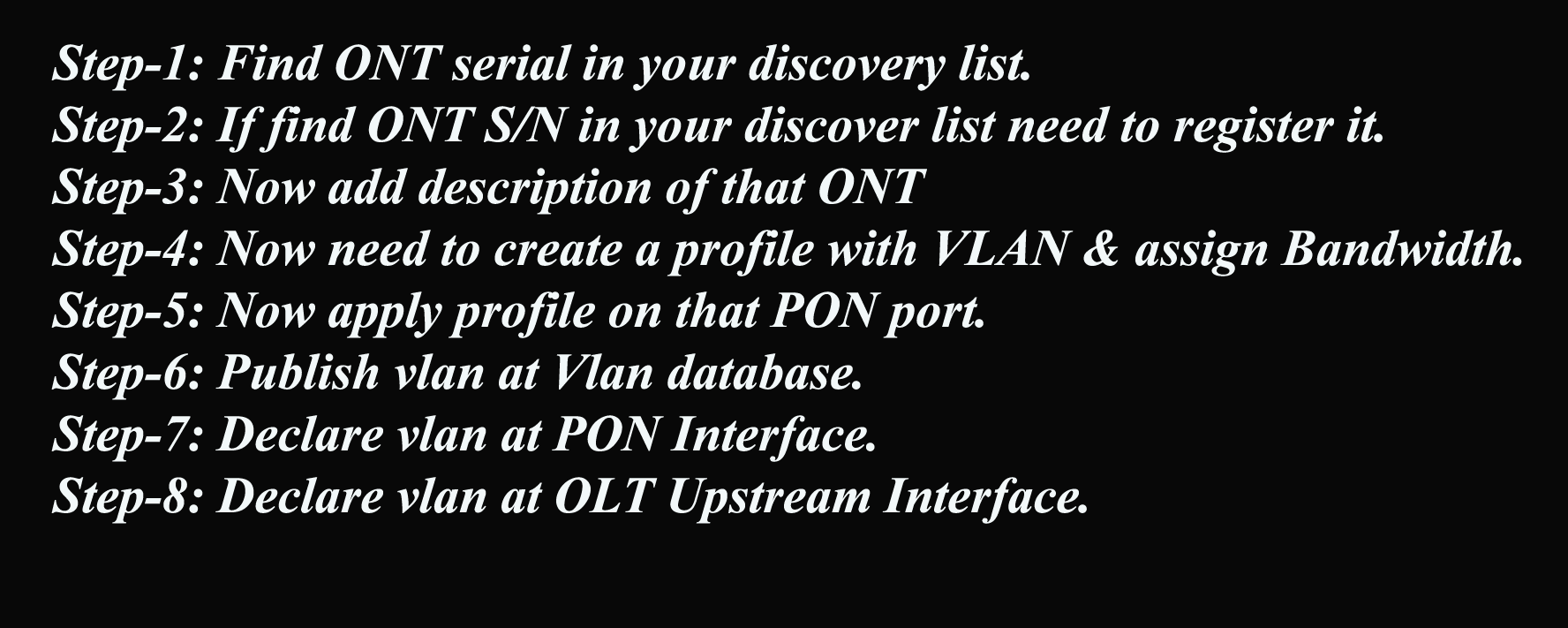
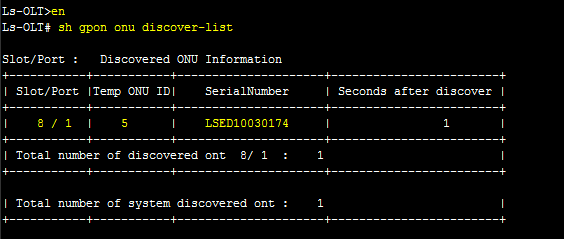
Step-1: Find ONT serial in your discovery list.

Ls-OLT>en
Ls-OLT#sh gpon onu discover-list

ONT discovery list
ONT discovery list

Step-2: If find your ONT discover list then need to register it.

Ls-OLT#config t
Ls-OLT(config)#gpon-omch
Ls-OLT(config-gpon)#onu register 8/1  5  LSED10030174

[N.B:8/1=PON interface, 5=ONT]

Step-3: Now add description of that ONT.

Ls-OLT(config-gpon)#onu describe 8/1 5 Desc_Name

Read more

Configure LsCable ONU

Configure LsCable ONU:

Today I will show you how to configure Lscable ONU. lets follow bellow steps………..[boxads]

Step-1: Change Host name

First login your Lscable ONU & Go to config mode then change Host name by bellow command…………..

enable
config terminal
hostname Ranks-3251

Step-2: Vlan declare.

Go to config mode then add your needed VLAN in ONU Vlan database. look like bellow………….

config terminal
vlan database
vlan 56
vlan 333
exit

Step-3: Interface configure.

Now configure your Ethernet port 1 in to access mode by bellow command…………

interface fe1
   switchport mode access
   switchport access vlan 56
   rate-limit input rate 1240 burst 2400
   rate-limit output rate 1240 burst 2400
   no shutdown
exit

Read more