
Configure Q-in-Q Lscable ONT:
Today i will show you how to configure q-in-q Ls cable ONT. Here i use ONT Ethernet port 1 to configure q-in-q. So let’s go to our configuration part. [boxads]
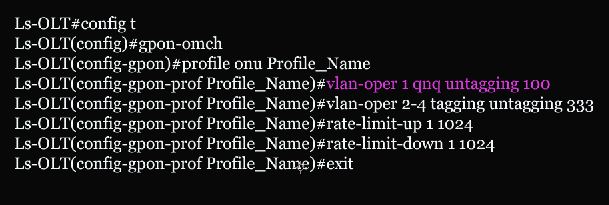
Here step 1 to 3 & 5 to 8 are same as How to register Ls Cable ONT. We change only step 4 for q-in-q configuration. Bellow pink color line is for q-in-q.
Step-4: Now need to create a profile with VLAN & assign Bandwidth.
Ls-OLT#config t
Ls-OLT(config)#gpon-omch
Ls-OLT(config-gpon)#profile onu Profile_Name
Ls-OLT(config-gpon-prof Profile_Name)#vlan-oper 1 qnq untagging 100
Ls-OLT(config-gpon-prof Profile_Name)#vlan-oper 2-4 tagging untagging 333
Ls-OLT(config-gpon-prof Profile_Name)#rate-limit-up 1 1024
Ls-OLT(config-gpon-prof Profile_Name)#rate-limit-down 1 1024
Ls-OLT(config-gpon-prof Profile_Name)#exit
[N.B: 1=Eth-port, 1024=Bandwidth in Kbps, 100= q-in-q VLAN & 333= management Vlan] [bodyads]
If any query please comments this topic
Video Tutorial For Configure Q-in-Q Lscable ONT:
