BGP Local-Preference Attribute Cisco Router

BGP Local-Preference Attribute Cisco Router

BGP Local-Preference Attribute Cisco is another BGP attribute that’s important in the decision process for multiple redundant paths. In fact, if you’re concerned about the order of things, you should know that on Cisco routers, the “weight” attribute is checked first, so that if a given neighbor has a higher weight, the local preference isn’t even checked. However, it’s still quite important because it is an important attribute on all routers, and it affects the BGP routing process in much the same way. [boxads]

Local Preference is one of the ways to alter the path taken by one AS to reach another AS. The difference between Local Preference and Weight is that Weight is just locally significant in the router while Local Preference is what I call “Local AS significant”. What I mean by that is that Local Preference is being propagated Intra AS but not outside the AS.

  • Local preference is to influence your own AS how to get or exit to another AS.
  • The higher the local preference, the more preferred.

In this lab, local preference will be configured and will be using route map for more flexibility. Check the diagram below for details.

BGP Local-Preference Attribute Cisco Router

R1, R2 and R3 belongs to AS 123. R4 is in AS4 and is advertising 4.4.4.4/32, 44.44.44.44/32 and 144.144.144.144/32
subnets.We need to set all routes learned from R3 to have local preference value of 300. After which, configure a
route-map that will assign a local preference of 500 in R2 for the network 144.144.144.144/32.
Read more

Change BGP Weight Attribute Cisco Router by Route Maps

Change BGP Weight Attribute Cisco Router by Route Maps

Change BGP Weight Attribute Cisco router by Route Maps. Weight attribute is used by BGP to break the tie when there are more routes to the same network. Route with the highest weight is preferred. Weight attribute is a Cisco feature, it has local meaning and it is not transmitted to other routers. [boxads]

In this example we will discuss about how to change BGP weight attribute cisco router by Route Maps.

Change BGP Weight Attribute Cisco Router by Route Maps

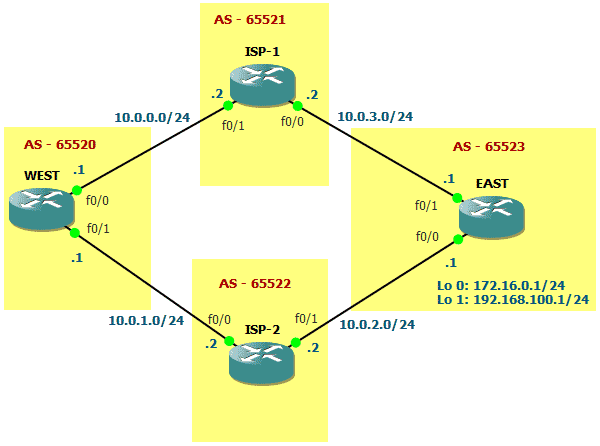
In the picture you see that WEST router in AS 65520 receives the routes advertised by EAST router in AS 65523 (172.16.0.0/24 and 192.168.100.0/24) over ISP-1 and ISP-2 routers. BGP will choose to reach those routes over ISP-1 or ISP-2. Let’s assume that all configurations are already made and all settings are left default. If so, let’s check bgp table of WEST router:

Read more

BGP Weight Attribute Configure

BGP Weight Attribute Configure

BGP Weight Attribute is a Cisco Proprietary attribute that influences a router how to reach a certain prefix. The difference between Local Preference and Weight is that the former is propagated within an AS and the latter is router locally significant. Weight can be used if there is one router connected to two or more AS’s or just to just one with two or more eBGP peers. Now, lets configure weight and later use a route-map for more complex use of weight. [boxads]

  • Weight is a Cisco Proprietary attribute for BGP that is “locally significant.”
  • Local Preference is a Well-known Discretionary attribute, Weight doesn’t belong to any category.
  • Default Weight for locally originated routes is 32768. Zero is the default for other routes.
  • Weight is not propagated to other routers within the AS.

In this lab, BGP Weight Attribute will be configured and will be using route map for more flexibility. Check the diagram below for details.

BGP Weight Attribute Cisco Proprietary attribute

Read more

DMVPN (Dynamic Multipoint VPN) Configuration Example

DMVPN Configuration Example:

In the DMVPN Overview  article We explained how DMVPN combines a number of technologies that give it its flexibility, low administrative overhead and ease of configuration. This article will cover the DMVPN Configuration including Hub, Spokes, Routing and Protecting the mGRE Tunnel.[boxads]

DMVPN Configuration is simple, if you’ve worked with GRE tunnels before.  If the GRE Tunnel concept is new to you, we would recommend reading through our Point-to-Point GRE IPSec Tunnel Configuration article before proceeding with DMVPN configuration.

DMVPN as a design concept is essentially the configuration combination of protected GRE Tunnel and Next Hop Routing Protocol (NHRP).

This article examines a specific DMVPN deployment architecture. Those seeking additional information on available DMVPN deplyment models can also visit my Dynamic Multipoint VPN DMVPN Architecture article.

DMVPN Operation – How DMVPN Operates:

Before diving into the configuration of our routers, we’ll briefly explain how the DMVPN is expected to work. This will help in understanding how DMVPN operates in a network:

  • Each spoke has a permanent IPSec tunnel to the hub but not to the other spokes within the network.
  • Each spoke registers as a client of the NHRP server. The Hub router undertakes the role of the NHRP server.
  • When a spoke needs to send a packet to a destination (private) subnet on another spoke, it queries the NHRP server for the real (outside) address of the destination (target) spoke.
  • After the originating spoke learns the peer address of the target spoke, it can initiate a dynamic IPSec tunnel to the target spoke.
  • The spoke-to-spoke tunnel is built over the multipoint GRE (mGRE) interface.
  • The spoke-to-spoke links are established on demand whenever there is traffic between the spokes. Thereafter, packets are able to bypass the hub and use the spoke-to-spoke tunnel.
  • All data traversing the GRE tunnel is encrypted using IPSecurity (optional)

Our DMVPN Network:

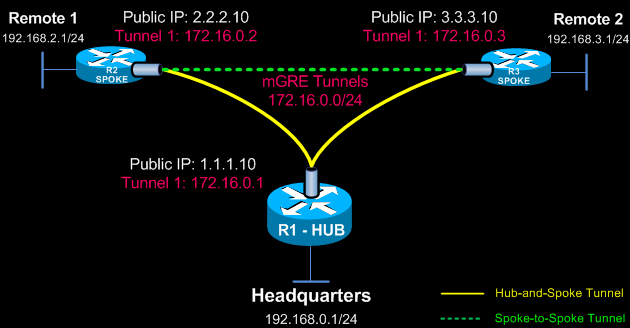
The diagram below depicts our DMVPN example network. Our goal is to connect the two remote networks (Remote 1 & 2) with the company headquarters. The headquarters router R1 is the central Hub router that will hold the NHRP database containing all spoke routers, their public IP addresses and LAN networks.

DMVPN Network Diagram

Read more

DMVPN Overview

DMVPN Overview:

Dynamic Multipoint VPN (DMVPN) is the increasing demands of enterprise companies to be able to connect branch offices with head offices and between each other while keeping low costs, minimizing configuration complexity and increasing flexibility.[bodyads]

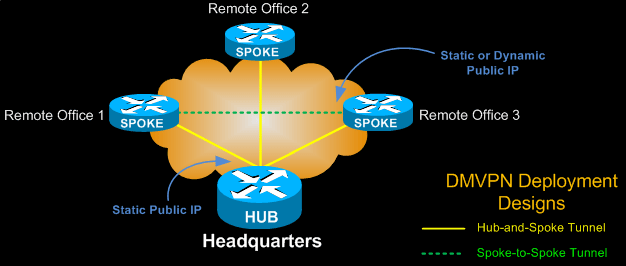
With DMVPN, one central router, usually placed at the head office, undertakes the role of the Hub while all other branch routers are Spokes that connect to the Hub router so the branch offices can access the company’s resources. DMVPN consists of two mainly deployment designs:

  • DMVPN Hub & Spoke, used to perform headquarters-to-branch interconnections
  • DMVPN Spoke-to-Spoke, used to perform branch-to-branch interconnections

In both cases, the Hub router is assigned a static public IP Address while the branch routers (spokes) can be assigned static or dynamic public IP addresses.

DMVPN Overview
DMVPN Overview

DMVPN combines multiple GRE (mGRE) Tunnels, IPSec encryption and NHRP (Next Hop Resolution Protocol) to perform its job and save the administrator the need to define multiple static crypto maps and dynamic discovery of tunnel endpoints.

NHRP is layer 2 resolution protocol and cache, much like Address Resolution Protocol (ARP) or Reverse ARP (Frame Relay).

The Hub router undertakes the role of the server while the spoke routers act as the clients. The Hub maintains a special NHRP database with the public IP Addresses of all configured spokes.

Read more

Dynamic Multipoint VPN DMVPN Architecture

Dynamic Multipoint VPN DMVPN Architecture:

There is a number of different ways an engineer can implement a DMVPN network. The fact that there is a variety of DMVPN Architecture models, each one with its caveats and requirements, means that almost any VPN requirement can be met as long as we have the correct hardware, software license and knowledge to implement it. [boxads]

Speaking of implementation, no matter how complex the DMVPN network might get, it’s pretty straight forward once it’s broken down into sections.

Engineers already working with complex DMVPNs can appreciate this and see the simplicity in configuration they offer.  At the end, it’s all a matter of experience.

Providing configuration for each deployment model is out of this article’s scope, however, we will identify key services used in each deployment model along with their strong and weak points.

Future articles will cover configuration of all DMVPN Architecture deployment models presented here.

Following are the most popular DMVPN deployment models found in over 85% of DMVPN Architecture across the globe:

  • Single DMVPN Network/Cloud  – Single Tier Headend Architecture
  • Single DMVPN Network/Cloud  – Dual Tier Headend Architecture
  • Dual DMVPN Network/Cloud – Single Tier Headend Architecture
  • Dual DMVPN Network/Cloud – Dual Tier Headend Architecture

In every case a complete DMVPN deployment consists of the following services, also known as control planes:

  1. Dynamic Routing (Next Hop Resolution Protocol)
  2. mGRE Tunnels
  3. Tunnel Protection – IPSec Encryption that protects the GRE tunnel and data

It’s time now to take a look at each deployment model.

Read more