
BGP Weight Attribute Configure
BGP Weight Attribute is a Cisco Proprietary attribute that influences a router how to reach a certain prefix. The difference between Local Preference and Weight is that the former is propagated within an AS and the latter is router locally significant. Weight can be used if there is one router connected to two or more AS’s or just to just one with two or more eBGP peers. Now, lets configure weight and later use a route-map for more complex use of weight. [boxads]
- Weight is a Cisco Proprietary attribute for BGP that is “locally significant.”
- Local Preference is a Well-known Discretionary attribute, Weight doesn’t belong to any category.
- Default Weight for locally originated routes is 32768. Zero is the default for other routes.
- Weight is not propagated to other routers within the AS.
In this lab, BGP Weight Attribute will be configured and will be using route map for more flexibility. Check the diagram below for details.

[adsense]All routers have BGP established and within its own AS.R4 is announcing 4 prefixes and the condition is
for R1 to reach routes 4.4.4.4/32, 44.44.4.44/32 and 144.144.144.144/32, it must take AS2. Then later
configure a route-map to so that R1 with take AS 3 to reach 144.144.144.144/32.
Here are the initial BGP configurations on the routers.
R1#
!
router bgp 1
no synchronization
bgp log-neighbor-changes
neighbor 12.12.12.2 remote-as 2
neighbor 13.13.13.3 remote-as 3
no auto-summary

R2#
!
router bgp 2
no synchronization
bgp log-neighbor-changes
neighbor 12.12.12.1 remote-as 1
neighbor 12.12.12.1 next-hop-self
neighbor 24.24.24.4 remote-as 4
no auto-summary

R3#
!
router bgp 3
no synchronization
bgp log-neighbor-changes
neighbor 13.13.13.1 remote-as 1
neighbor 13.13.13.1 next-hop-self
neighbor 34.34.34.4 remote-as 4
no auto-summary

R4#
!
router bgp 4
no synchronization
bgp log-neighbor-changes
network 4.4.4.4 mask 255.255.255.255
network 44.44.44.44 mask 255.255.255.255
network 144.144.144.144 mask 255.255.255.255
neighbor 24.24.24.2 remote-as 2
neighbor 34.34.34.3 remote-as 3
no auto-summary
[bodyads]
Lets see how R1 reaches the prefixes announced by R4.
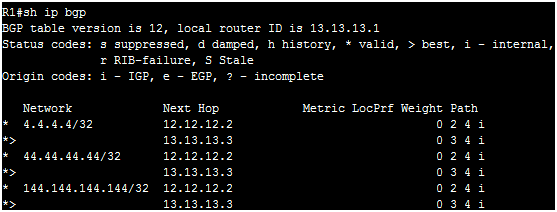
Ok, it takes AS3 to reach the prefixes. Now, lets configure Weight to make AS2 the more preferred path to reach the prefixes.
R1(config)#router bgp 1
R1(config-router)#neighbor 12.12.12.2 weight 100
R1(config-router)#do clear ip bgp * soft
Now let’s see if that changes after clearing the BGP session “softly”.
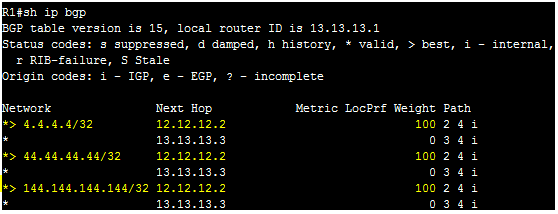
It’s now taking AS 2. Let’s configure a route-map so R1 will take AS3 to reach 144.144.144.144/32. The weight should be 200. We will apply the route-map towards neighbor 13.13.13.3. [bodylink]
R1(config)#access-list 1 permit host 144.144.144.144
R1(config)#route-map TAKE_AS3 permit 10
R1(config-route-map)#match address 1
R1(config-route-map)#set weight 200
R1(config-router)#neighbor 13.13.13.3 route-map TAKE_AS3 in
R1(config-router)# do clear ip bgp * soft
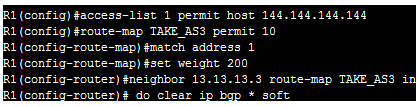
The ACL is to filter which routes be given a weight of 200. The reason the route-map was configured inbound direction because we are receiving the routes from that neighbor. Let’s see what happens to the BGP table.
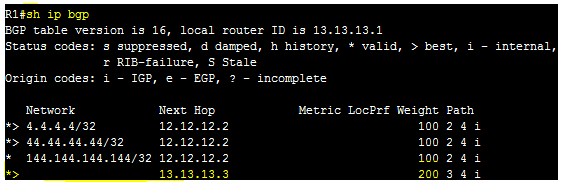
Now, R1 will take AS3 to reach 144.144.144.144/32. Notice that the weight now is 200, and its more preferred.
