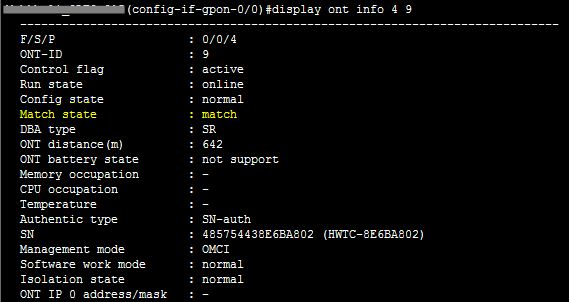
Match state mismatch in Huawei ONT

Match state mismatch in Huawei ONT:

When you found Match State : mismatch in Huawei ONT by display ont info command, then which type step taken you ? [boxads]

Don’t  worry i will show how to solved this problem……………….
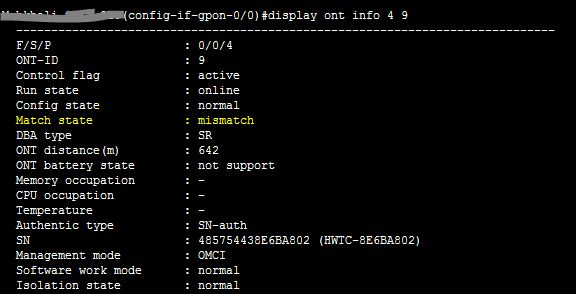
Match state mismatch

This types of problem occur if ONT port & pots should not configure properly in ont srvprofile. Suppose your ONT have 2 pots & 4 eth port, If you configure 4 pots & 4 eth port or 4 pots & 2 eth port, It is not match your ONT because your ONT have 2 pots & 4 eth port. So if you configure srvprofile properly with pots & eth port, Then your problem will be solved.

Now i show you how to edit ont srvprofile & change mismatch pots & eth port.

[bodyads]

At first go to config mode, then type ont-srvprofile gpon profile-id 156

[ N.B: Here 156 = profile-id ]

now type ont-port pots 2 eth 4

then commit & quit
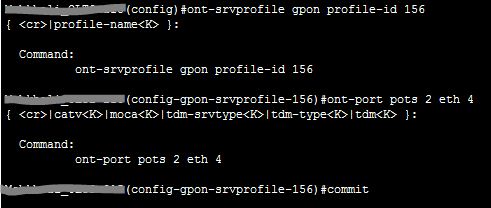
Edit ont-srvprofile
Edit ont-srvprofile

Now you see your problem is solved.

Match state match
Match state match

Please follow bellow my video tutorial.

Shahed

Shahed

Shahed Israr is a Network Engineer specializing in GPON, FTTH, and telecom access network technologies. With hands-on experience in Huawei OLT and ONT configuration, U2000 NMS deployment, iMaster NCE-FAN Lite management systems, firmware upgrades, and advanced network troubleshooting, he helps Internet Service Providers (ISPs) and network professionals deploy, manage, and optimize fiber optic networks efficiently. Through GPON Solution, he shares practical technical guides, real-world solutions, and professional knowledge to support engineers working in modern GPON infrastructure.

More Posts - Website

Follow Me:Add me on XAdd me on FacebookAdd me on LinkedInAdd me on PinterestAdd me on YouTubeAdd me on Reddit

Comments

comments

Leave a Comment

Time limit is exhausted. Please reload CAPTCHA.