Shahed Israr is a Network Engineer specializing in GPON, FTTH, and telecom access network technologies. With hands-on experience in Huawei OLT and ONT configuration, U2000 NMS deployment, iMaster NCE-FAN Lite management systems, firmware upgrades, and advanced network troubleshooting, he helps Internet Service Providers (ISPs) and network professionals deploy, manage, and optimize fiber optic networks efficiently. Through GPON Solution, he shares practical technical guides, real-world solutions, and professional knowledge to support engineers working in modern GPON infrastructure.
Service Profile create by iMaster NCE-FAN NMS Today I will give example how to Create Service Profile by iMaster NCE-FAN NMS. Its just example, you need to configure profile by use your VLAN & which port you want to configure which VLAN. Follow below step by step process: 1. Log in your iMaster NCE-FAN NMS … Read more
Line Profile Create by iMaster NCE-FAN NMS Today I will give example how to Create Line Profile by iMaster NCE-FAN NMS. Its just example, you need to configure profile by use your VLAN & which port you want to configure which VLAN. You need to create a DBA profile before creating a Line profile. You … Read more
DBA Profile Create in NCE-FAN NMS Here i give example how DBA Profile create in NCE-FAN NMS. DBA profile is dynamic bandwidth allocation profile, Which improving upstream bandwidth utilization in GPON Network. Before line Profile configure you need to configure DBA profile. Follow below step by step process: 1. Log in to NCE and choose … Read more
Failure: The number of ONT Ethernet ports has reached the maximum of the PON port
ONT add time OLT showing one error “The number of ONT Ethernet ports has reached the maximum of the PON port”. This issue only occurred when add ONT at PON port 0/1/2 , others PON port is normal when we add ONT. [boxads]
Command: ont add 2 sn-auth 4857544xxx0A1042D omci ont-lineprofile-id 1 ont-srvprofile-id 1 Failure: The number of ONT Ethernet ports has reached the maximum of the PON port
Failure: The Total Number of ONTs Is Beyond the System Limitation If anybody get “Failure: The Total Number of ONTs Is Beyond the System Limitation” message for ONT configure time from MA5608T MCUD/MCUD1 Board OLT then you need to upgrade OLT Firmware version, because number of connected ONTs depends on the OLT service boards & … Read more
Today I will discuss about Huawei OLT Board Status and Description, When New OLT power on, new board add or if reboot OLT then we see many board status in OLT like Failed, Auto_find, Auto_load, Config, or Normal etc state.
We can see OLT board status by “display board 0″ or below command format.
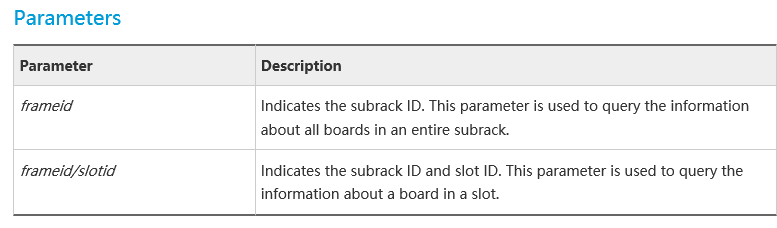
display boardframeid [ frameid/slotid ]
This command is used to query the information about the boards in an entire subrack or the details of a specified board. To query the slot ID, name, status, daughter board information, port information, and online/offline state of the board after performing an operation on the board, run this command.
Usage Guidelines
You can query the board status to check whether the current status of the board is normal. The board states are as follows.
Board Status
Status and Description
Need Handling or Not?
Normal
The board is in the normal state.
No need to proceed.
Auto_load
The board is in the automatic loading state. When a service board is inserted in a service slot, the board reports its version information to the system. If the version of the board software is different from that stored in the flash memory of the control board, the system automatically loads the software from the flash memory to the board.
No need to proceed.
Auto_find
The board in the auto-find state.
The board can be used only after you run the board confirm command to confirm the board.
Config
The board enters the configuration state after it is confirmed.
No need to proceed.
Failed
The board is in the failed state.
The fault needs to be rectified.
The causes for the board failure are as follows: •An offline board is added. In this case, insert a board of the same type into the corresponding slot. Several minutes later, check whether the board is in the normal state. •Loading the board program fails. In this case, run the display io-packetfile command to check whether the corresponding software package of the board is loaded to the flash memory of the control board. If the corresponding software package is not loaded, load the corresponding board software.
If the fault persists after the preceding operations, contact Huawei for technical support.
Mismatch
The board is in the type mismatch state.
You need to run the board delete command to delete the type of the board in the slot. Then, the system will automatically recognize the board type.
HTempShutdown
The board is in the high-temperature shutdown state.
No need to proceed. This is an energy-saving feature. The board is automatically shut down if the board temperature exceeds the threshold. By default, the board recovers 15 minutes later.
ManualShutdown
The board is in the manual shutdown state.
This is an energy-saving feature. After you run the board power-off command to power off the idle board, the board status is displayed as ManualShutdown.
If you need to change the shutdown state, you can run the board power-on command to power on the board.
ESavingShutdown
Indicates that the board is in the energy-saving shutdown state.
This is an energy-saving feature. The board enters the energy-saving shutdown state in the following case: If you run the system energy-saving mode deep command to set the energy-saving mode to the deep energy-saving mode, online and normal service boards that are not configured with any service will be powered off after 15 minutes, and then the boards enter the energy-saving shutdown state.
No action is required for this state. Boards that are not configured with any service are automatically powered off because the deep energy-saving mode or optimal energy-saving mode is applied to these boards. If you configure service data for these boards or modify the energy-saving mode to the basic energy-saving mode or standard energy-saving mode, the board will be automatically powered on after a period of time.
Prohibited
The board is in the prohibited state. Before finding, diagnosing, and rectifying a fault of the faulty board, run the board prohibit command to prohibit the board. Then the board status is displayed as Prohibited.
You can run the undo board prohibit command to un-prohibit the