VLAN Configure in ZTE OLT Uplink Port

VLAN Configure in ZTE OLT Uplink Port

[boxads]

Today i will be discuss how to VLAN Configure in ZTE OLT Uplink Port.

Prerequisites:

  •  Make sure that the network device works normally.
  •  Log in to the ZXA10 C220 through HyperTerminal or Telnet.

Context:

To configure the VLAN uplink port, perform the following steps:

Step-1. Use the configure terminal command to enter global configuration mode.
Step-2. Use the interface to enter the uplink interface configuration mode.
Step-3. Use the switchport vlan command to configure VLAN uplink port.

Note: When a port is added to a VLAN, the VLAN is added automatically.

Step-4. Use the show vlan port command to query port VLAN configuration.

Read more

Configure VLAN Port Mode in ZTE OLT

Configure VLAN Port Mode in ZTE OLT:

[boxads]

Today i will be discuss how to Configure VLAN Port Mode in ZTE OLT.

Prerequisites:

  • Make sure that the network device works normally.
  • The ONU is registered.
  • Log in to the ZXA10 C220 through HyperTerminal or Telnet.

Context:

ZXA10 C220 ports support the following VLAN modes:

  • Access mode: Accepts untag packets only and can be added to only one VLANs in utag mode.
  • Trunk mode: Accepts tag packets only and can be added to multiple VLANs in tag mode.
  • Hybrid mode: Accepts both tag or untag packets and can be added to multiple VLANs in either tag or untag mode.
  • Transparent mode: Accepts all tag packets.

To configure the port VLAN mode, perform the following steps:

Step-1. Use the configure terminal command to enter global configuration mode.

Step-2. Use the interface command to enter interface configuration mode.
Step-3. Use the switchport mode command to configure port VLAN mode.

Note: The default port mode is hybrid.

Step-4. Use the show vlan port command to query port VLAN configuration.

Read more

VLAN Add ZTE ZXA10 C220 GPON OLT

VLAN Add ZTE ZXA10 C220 GPON OLT

[boxads]

Today i will be discuss how to configure / VLAN Add ZTE ZXA10 C220 GPON OLT.

Prerequisites:

  • Make sure that the network device works normally.
  • Log in to the ZXA10 C220 through HyperTerminal or Telnet.

Context:

VLAN is used to isolate ports on a device by dividing ports to different network segment logically.

To add the VLAN, perform the following steps:

Step-1. Use the configure terminal command to enter global configuration mode.
Step-2. Use the vlan command to add single VLAN.
Step-3. Use the vlan database command to enter VLAN batch configuration mode.
Step-4. Use the vlan command to add multiple VLANs.
Step-5. Use the show vlan command to query VLAN configuration.

Example of VLAN Add ZTE ZXA10 C220 GPON OLT:

Add VLAN 2.
ZXAN#configure terminal
Enter configuration commands, one per line. End with CTRL/Z.
ZXAN(config)#vlan 2
ZXAN(config-vlan)#end

Read more

Configure H.248 VoIP Service in ZTE OLT

Configure H.248 VoIP Service in ZTE OLT:

[boxads]

Today i will discuss how to Configure H.248 VoIP Service in ZTE OLT.

Prerequisites:

  • Make sure that the network device works normally.
  • The GPON card works normally.
  • The corresponding VoIP resource data is configured on the SS.
  • The in-band NM IP address of the ZXA10 C220 is configured.
  • Log in to the ZXA10 C220 through HyperTerminal or Telnet.

Networking Diagram:

Below figure shows the H.248 VoIP service networking diagram.

Configure H.248 VoIP Service networking diagram

Data Configuration:
Below table describes the H.248 VoIP service data configuration.

H.248 VoIP Service data configuration
H.248 VoIP Service data configuration 2

Read more

Configure SIP VoIP Service ZTE OLT

Configure SIP VoIP Service in ZTE OLT:

[boxads]

Today i will discuss how to Configure SIP VoIP Service in ZTE OLT.

Prerequisites:

  • Make sure that the network device works normally.
  • Make sure that the GPON card works normally.
  • The corresponding VoIP resource data is configured on the SIP server.
  • Log in to the ZXA10 C220 through HyperTerminal or Telnet.

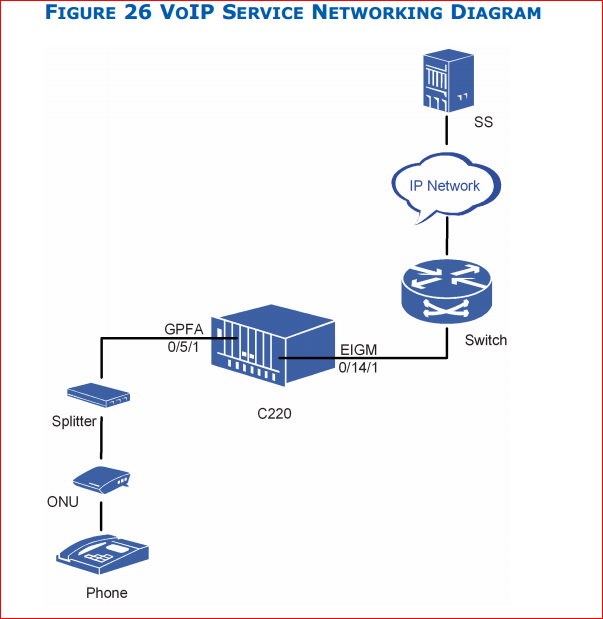
Networking Diagram:
Bellow figure shows the SIP VoIP service networking diagram.

Configure SIP VoIP Service networking diagram

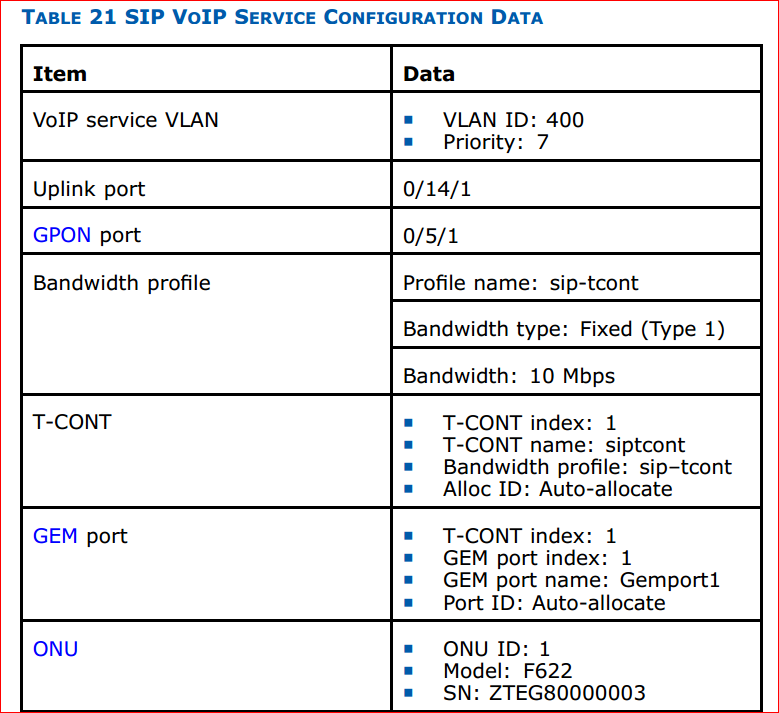
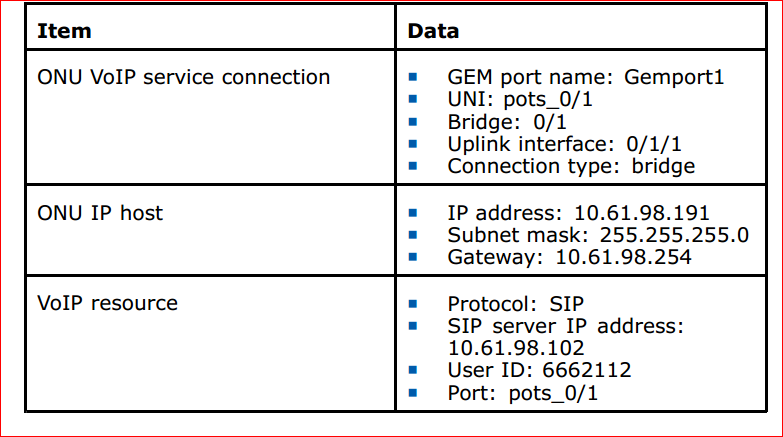
Configuration Data:
Below Table describes the SIP VoIP service configuration data.

Configure SIP VoIP Service configuration data 1Configure SIP VoIP Service configuration data

Read more

Configure CDR Parameters in ZTE OLT

Configure CDR Parameters in ZTE OLT

[boxads]

Today i will discuss about how to Configure CDR Parameters in ZTE OLT.

Prerequisites:

  • Make sure network device works normally.
  • Log in to the ZXA10 C220 through HyperTerminal or Telnet.

Context:

Table 16 describes ranges and default values of CDR global parameters.

Configure CDR Parameters in ZTE OLT 1Configure CDR Parameters in ZTE OLT 2

To configure the CDR parameters, perform the following steps:

1. Use the configure terminal command to enter global configuration mode.
2. Use the iptv cdr enable command to enable global CDR function.
3. Use the iptv cdr max-records command to configure CDR maximum records.
4. Use the iptv cdr report command to report CDR manually.
5. Use the iptv cdr report-interval command to configure CDR automatic report interval.
6. Use the iptv cdr report-threshold command to configure CDR automatic report threshold.
7. Use the iptv cdr create-period command to configure CDR generating period.
8. Use the iptv cdr deny-right command to enable or disable CDR function when user right is deny.
9. Use the iptv cdr prw-right command to enable or disable CDR function when user right is preview.
10. Use the iptv cdr prw-overcount command to enable or disable CDR function when user preview count is over limit.
11. Use the iptv cdr clear command to clear CDR record.
12. Use the show iptv cdr command to query CDR configuration.

Read more