
OSPF Load Balancing Example

OSPF Load Balancing:

[boxads] Today I will show how to configure OSPF load balancing, If we follow bellow example we see a client is connected through two WAN connections with two broadband routers that both are use for Internet routing. We will enable and disable OSPF load balancing packets that are sourcing from the HOST to the WEB SERVER.   Following the diagram:
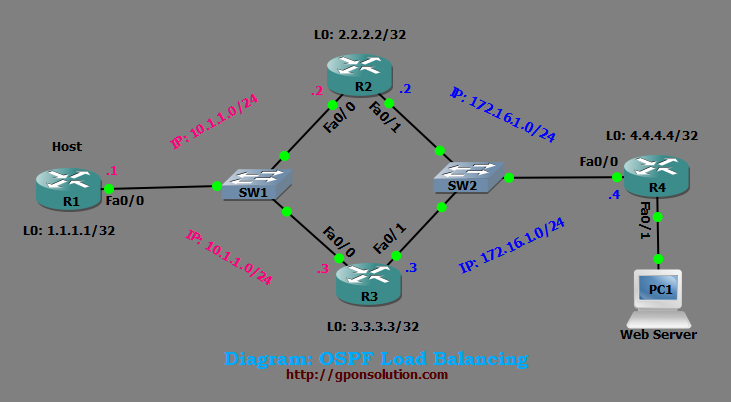
OSPF Load Balancing Tutorial

Now lets go our OSPF Load Balancing Configuration part………..

Router R1:

R1#
R1#conf t
R1(config)#ip cef
R1(config)#int loopback 0
R1(config-if)#ip address 1.1.1.1 255.255.255.255
R1(config-if)#ip ospf network point-to-point
R1(config-if)#exit
Read more

NAT PAT Configuration Packet Tracer

NAT PAT Configuration Packet Tracer

Today i will discuss how to configure NAT PAT Configuration Packet Tracer simulator. Network address translation (NAT) is the process of modifying IP address information in IP packet headers while in transit across a traffic routing device. [boxads]

There are two different types of NAT:


  • NAT
    • Static NAT: The simplest type of NAT provides a one-to-one translation of IP addresses. It is often also referred to as one-to-one NAT. In this type of NAT only the IP addresses, IP header checksum and any higher level checksums that include the IP address need to be changed. The rest of the packet can be left untouched (at least for basic TCP/UDP functionality, some higher level protocols may need further translation). Basic NATs can be used when there is a requirement to interconnect two IP networks with incompatible addressing. With static NAT, translations exist in the NAT translation table as soon as you configure static NAT command(s), and they remain in the translation table until you delete the static NAT command(s).
    • Dynamic NAT: Dynamic NAT has some similarities and differences compared to static NAT. Like static NAT, the NAT router creates a one-to-one mapping between an inside local and inside global address and changes the IP addresses in packets as they exit and enter the inside network. However, the mapping of an inside local address to an inside global address happens dynamically. Dynamic NAT sets up a pool of possible inside global addresses and defines matching criteria to determine which inside local IP addresses should be translated with NAT. The dynamic entry stays in the table as long as traffic flows occasionally. With dynamic NAT, translations do not exist in the NAT table until the router receives traffic that requires translation. Dynamic translations have a timeout period after which they are purged from the translation table.
  • PAT
    • Static PAT: Static PAT translations allow a specific UDP or TCP port on a global address to be translated to a specific port on a local address. Static PAT is the same as static NAT, except that it enables you to specify the protocol (TCP or UDP) and port for the real and mapped addresses. Static PAT enables you to identify the same mapped address across many different static statements, provided that the port is different for each statement. You cannot use the same mapped address for multiple static NAT statements. With static PAT, translations exist in the NAT translation table as soon as you configure static PAT command(s), and they remain in the translation table until you delete the static PAT command(s).
    • NAT Overload or PAT: It is common to hide an entire IP address space, usually consisting of private IP addresses, behind a single IP address (or in some cases a small group of IP addresses) in another (usually public) address space. This type of NAT is called PAT in overload. The dynamic entry stays in the table as long as traffic flows occasionally. With PAT in overload, translations do not exist in the NAT table until the router receives traffic that requires translation. Translations have a timeout period after which they are purged from the translation table.

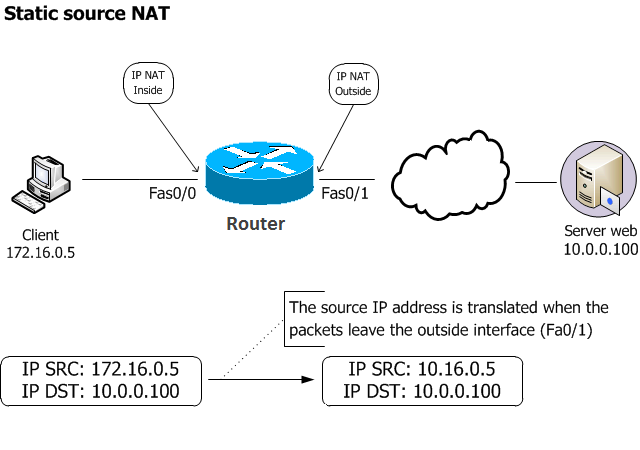
NAT PAT Configuration Packet Tracer Example #1: Static Source NAT

  • How to translate the 172.16.0.5 IP address to the 10.16.0.5 ip address.
NAT PAT Configuration Packet Tracer

Define the ip nat inside:
Router(config)#interface fa0/0
Router(config-if)#ip nat inside

Read more

Cisco ROMmon Recovery Procedure

Cisco ROMmon Recovery Procedure:

Today i will discuss cisco rommon recovery procedure step by step. so lets go………..

1. Start the TFTP server (make sure the file path is correct and that you allow both transfer and receive)
2.  Connect to the router via Ethernet cable (an Ethernet cable is preferred due to the large size of the file and the maximum speed that data can travel over the console cable) [boxads]

N.B:  Before the IOS is loaded it is important to make sure that your router has enough memory to support the IOS. The router will allow an IOS to be loaded even if there is not enough memory, in this case a smaller IOS will have to be loaded.

3.   At the rommon prompt enter the following commands (commands are case sensitive, and the use of the directional arrows and tab auto complete function is not allowed):

IP_ADDRESS=IP address of the Ethernet port
IP_SUBNET_MASK=subnet mask of the Ethernet port
DEFAULT_GATEWAY=the default gateway
TFTP_SERVER=the IP of the TFTP server (your local computer)
TFTP_FILE=the file name of the IOS file
tftpdnld

4.   The router will then issue a warning message:

Read more

Initial configuration of CISCO Router

Initial configuration of CISCO Router:

Initial configuration of CISCO Router:
At first power on your router & connect console cable to router console port. then use bellow command [boxads]

Router>enable
Router#conf t
Router(config)#

Now copy and past below command after change [xxxxxxx] this portion as your requirement.

hostname Router_Name

enable secret xxxxxxx

username xxxxxx privilege 15 secret xxxxxxxx
username xxxxxx privilege 3 secret xxxxxxx

interface FastEthernet0/0
des ” Local OM Interface”
ip address 1.1.1.1 255.255.255.0
no shutdown
full-duplex
exit

Read more

Initial Configuration CISCO Router

Initial configuration CISCO Router:

At first power on your router & connect console cable to router console port. then use bellow command……………… [boxads]

Router>enable
Router#conf t
Router(config)#

Now copy and past below command after change [xxxxxxx] this portion as your requirement.

hostname Router_Name

enable secret xxxxxxx

username xxxxxx privilege 15 secret xxxxxxxx
username xxxxxx privilege 3 secret xxxxxxx

interface FastEthernet0/0
des ” Local OM Interface”
ip address 1.1.x.x 255.255.x.x
no shutdown
full-duplex
exit

Read more

IOS upgrade CISCO Router

IOS upgrade CISCO Router:

Install TFTP server on your PC/Laptop. Then keep your updated IOS on “C:TFTP-Root” directory & set ip and subnet mask on your NIC card. Here i use: 1.1.1.10 255.255.255.0  ip of my pc. [boxads]

Router#sh flash:

System flash directory:
File  Length   Name/status
1   33725096  asr901-universalk9-mz.152-2.SNI.bin
2   1180     CAT1811U22B_1396860941.lic
[33726404 bytes used, 66674744 available, 100401148 total]
98304K bytes of processor board System flash (Read/Write)

[bodyads]

Router#
Router#erase flash:
Erasing the flash filesystem will remove all files! Continue? [confirm]
Erasing device… eeeeeeeeeeeeeeeeeeeeeeeeeeeeeeeeeeeeeeeeeeeeeeeeeeeeeeeeeeeeeeeeeee
eeeeeeeeeeeeeeeeeeeee …erased

Read more