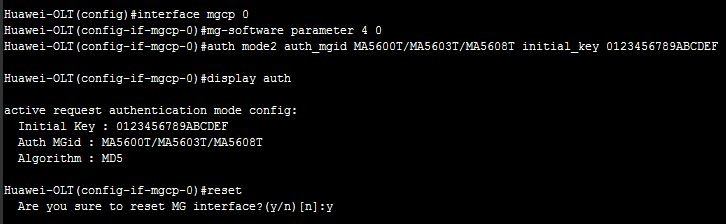
Device Authentication Configure (MGCP-based):
This topic describes how to configure the MGCP-based authentication parameters for the MG interface on the MA5600T/MA5603T/MA5608T to implement device authentication and prevent illegal MGs from registering with the MGC. [boxads]
Prerequisite:
- The MG interface must be configured successfully.
- The parameters, are including the encryption type, initial key, DH authentication, and MG ID, must be configured on the MGC. This parameters must be the same as the parameters configured on the MA5600T/MA5603T/MA5608T.
Procedure:
Step 1: In the global config mode, run the interface mgcp command to enter the MG interface mode.
Step 2: Run the mg-software parameter 4 command to configure the registration mode.
Step 3: Run the auth command to configure the authentication MG ID and the initial key.
If Huawei products such as the SoftX3000 is used as the MGC, the authentication MG ID must
be a character string with more than eight bits.
[adsense]
NOTE:
When the MGCP protocol is used, the MG interface supports two authentication modes:
- Passive authentication mode: In this mode, the device registers with the MGC and is authenticated only after required by the MGC.
- Active authentication mode: In this mode, the device is authenticated when the device registers with the MGC. In actual applications, you can select the authentication mode according to the requirements.
Step 4: Run the display auth command to query the authentication parameters.
Step 5: Run the reset command to reset the MG interface.
Example of Device Authentication Configure:
Huawei-OLT(config)#interface mgcp 0
Huawei-OLT(config-if-mgcp-0)#mg-software parameter 4 0
Huawei-OLT(config-if-mgcp-0)#display mg-software parameter 4
————————————————-
Interface Id:0 para index:4 value:0
-------------------------------------------------
APPENDIX:
-------------------------------------------------
Interface software parameter name:
4: Whether MG register to MGC with wildcard
0: Yes
1: No
Huawei-OLT(config-if-mgcp-0)#auth mode2 auth_mgid MA5600T/MA5603T/MA5608T initial_key 0123456789ABCDEF
Huawei-OLT(config-if-mgcp-0)#display auth
active request authentication mode config:
Initial Key : 0123456789ABCDEF
Auth MGid : MA5600T/MA5603T/MA5608T
Algorithm : MD5 [bodyads]
Huawei-OLT(config-if-mgcp-0)#reset
Are you sure to reset MG interface?(y/n)[n]:y