Huawei OLT HWTACACS Authentication (User Management):
Today I will show how to configure HWTACACS Authentication (User Management ) so lets go………… [boxads]
Prerequisites:
- The route from the MA5600T/MA5603T/MA5608T to the HWTACACS server must be configured.
- The management user information (user name@domain and password) must be configured on the HWTACACS server.
Service Requirements:
- The HWTACACS server performs authentication for management user of domain isp1.
- The user logs in to the server carrying the domain name.
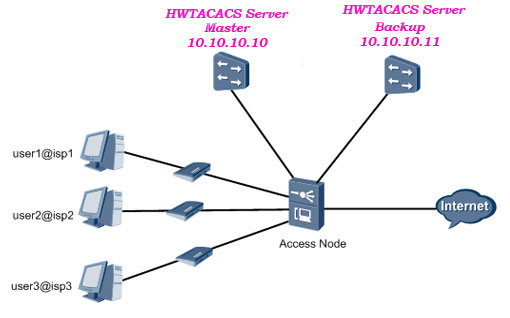
- The HWTACACS server with the IP address 10.10.10.10 functions as the primary server for authentication.
- The HWTACACS server with the IP address 10.10.10.11 functions as the secondary server for authentication.
- Other parameters adopt the default settings.
Topology Diagram HWTACACS authentication:
Procedure:
Step 1: Configure the authentication scheme.
- Configure authentication scheme named login-auth(users are authenticated through HWTACACS).
Huawei-OLT(config)#aaa
Huawei-OLT(config-aaa)#authentication-scheme login-auth
Huawei-OLT(config-aaa-authen-login-auth)#authentication-mode hwtacacs
Huawei-OLT(config-aaa-authen-login-auth)#quit
[adsense]
Step 2: Configure the HWTACACS protocol.
- Create HWTACACS server template named ma56t-loginwith HWTACACS server 10.10.10.10 as the primary authentication server, and HWTACACS server 10.10.10.11 as the secondary authentication server.
Huawei-OLT(config)#hwtacacs-server template ma56t-login
Create a new HWTACACS-server template
Huawei-OLT(config-hwtacacs-ma56t-login)#hwtacacs-server authentication 10.10.10.10 1812
Huawei-OLT(config-hwtacacs-ma56t-login)#hwtacacs-server authentication 10.10.10.11 1812 secondary
Huawei-OLT(config-hwtacacs-ma56t-login)#quit
Step 3: Create a domain named isp1.
NOTE:
- A domain is a group of users of the same type.
- In the user name format userid@domain-name (for example, Shahed@huawei.net), “userid” indicates the user name for authentication and “domain-name” followed by “@” indicates the domain name.
- The domain name for user login cannot exceed 15 characters, and the other domain names cannot exceed 20 characters.
Huawei-OLT(config)#aaa
Huawei-OLT(config-aaa)#domain isp1
Info: Create a new domain
Step 4: Use the authentication scheme login-auth.
You can use an authentication scheme in a domain only after the authentication scheme is created.
Huawei-OLT(config-aaa-domain-isp1)#authentication-scheme login-auth
Step 5: Bind the HWTACACS server template ma56t-loginto the user.
-You can use an HWTACACS server template in a domain only after the HWTACACS server template is created.
Huawei-OLT(config-aaa-domain-isp1)#hwtacacs-server ma56t-login
[bodyads]
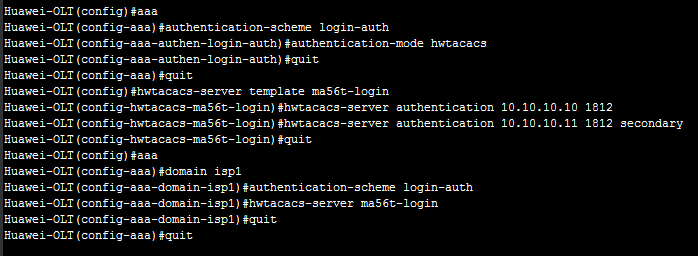
Configuration Huawei OLT HWTACACS Authentication:
Huawei-OLT(config)#aaa
Huawei-OLT(config-aaa)#authentication-scheme login-auth
Huawei-OLT(config-aaa-authen-login-auth)#authentication-mode hwtacacs
Huawei-OLT(config-aaa-authen-login-auth)#quit
Huawei-OLT(config-aaa)#quit
Huawei-OLT(config)#hwtacacs-server template ma56t-login
Huawei-OLT(config-hwtacacs-ma56t-login)#hwtacacs-server authentication 10.10.10.10 1812
Huawei-OLT(config-hwtacacs-ma56t-login)#hwtacacs-server authentication 10.10.10.11 1812 secondary
Huawei-OLT(config-hwtacacs-ma56t-login)#quit
Huawei-OLT(config)#aaa
Huawei-OLT(config-aaa)#domain isp1
Huawei-OLT(config-aaa-domain-isp1)#authentication-scheme login-auth
Huawei-OLT(config-aaa-domain-isp1)#hwtacacs-server ma56t-login
Huawei-OLT(config-aaa-domain-isp1)#quit
Huawei-OLT(config-aaa)#quit
Look Like bellow format in OLT: