
AAA Config Huawei OLT by HWTACACS protocol

AAA Config Huawei OLT by HWTACACS protocol:

Today i will show how to configure AAA in Huawei OLT by using HWTACACS protocol. [boxads]

Service Requirements:

  • The HWTACACS server performs authentication, authorization, and accounting for 802.1X access users.
  • The user logs in to the server carrying the domain name.
  • The HWTACACS server with the IP address 10.10.10.10 functions as the primary server for authentication, authorization, and accounting.
  • The HWTACACS server with the IP address 10.10.10.11 functions as the secondary server for authentication, authorization, and accounting.
  • Other parameters adopt the default settings.

 Technology Diagram:
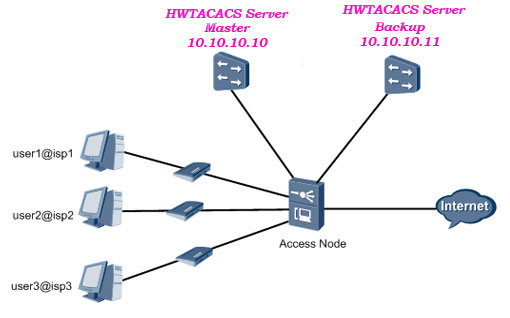
AAA Config Huawei OLT by HWTACACS

Procedure:

Step 1: Configure the AAA authentication scheme.

-The authentication scheme specifies how all the users in an ISP1 domain are authenticated.
-The system supports up to 16 authentication schemes. The system has a default authentication
scheme named default. It can be modified, but cannot be deleted.

  • 1. Run the aaa command to enter the AAA mode.
  • 2. Run the authentication-scheme command to add an authentication scheme.
  • 3. Run the authentication-mode local command to configure the authentication mode of the authentication scheme. Use the HWTACACS protocol to authenticate users.
  • 4. Run the quit command to return to the AAA mode.

[bodyads]

Configuration Example of  authentication scheme:

Configure authentication scheme named newscheme (users are authenticated through HWTACACS).

Huawei-OLT(config)#aaa
Huawei-OLT(config-aaa)#authentication-scheme newscheme
Huawei-OLT(config-aaa-authen-newscheme)#authentication-mode hwtacacs
Huawei-OLT(config-aaa-authen-newscheme)#quit

Read more

AAA Configuration Huawei OLT by Radius protocol

AAA Configuration Huawei OLT by Radius protocol:

Today i will show how to configure AAA in Huawei OLT by Radius protocol. [boxads]

Service Requirements:

  • The RADIUS server performs authentication and accounting for users in the ISP1 domain.
  • The RADIUS server with the IP address 10.10.10.10 functions as the primary server for authentication and accounting.
  • The RADIUS server with the IP address 10.10.10.11 functions as the secondary server for authentication and accounting.
  • The authentication port number is 1812, and the accounting port number is 1813.
  • Other parameters adopt the default settings.

Topology Diagram: 

The below figure shows an example network Diagram of the RADIUS Authentication and Accounting application.

Topology Diagram AAA Configuration Huawei OLT by Radius protocol

Procedure:

Step 1: Configure the authentication scheme.

NOTE:
– The authentication scheme specifies how all the users in an ISP1 domain are authenticated.
-The system supports up to 16 authentication schemes. The system has a default accounting scheme named default. It can only be modified, but cannot be deleted.

  • 1. Run the aaa command to enter the AAA mode.
  • 2. Run the authentication-scheme command to add an authentication scheme.
  • 3. Run the authentication-mode radius command to configure the authentication mode of the authentication scheme.
  • 4. Run the quit command to return to the AAA mode.

Configuration Example of authentication scheme:

Configure authentication scheme named newscheme (users are authenticated through RADIUS).

Huawei-OLT(config)#aaa
Huawei-OLT(config-aaa)#authentication-scheme newscheme
Info: Create a new authentication scheme
Huawei-OLT(config-aaa-authen-newscheme)#authentication-mode radius
Huawei-OLT(config-aaa-authen-newscheme)#quit

Read more

Huawei OLT HWTACACS Authentication (User Management)

Huawei OLT HWTACACS Authentication (User Management):

Today I will show how to configure HWTACACS Authentication (User Management ) so lets go………… [boxads]

Prerequisites:

  •  The route from the MA5600T/MA5603T/MA5608T to the HWTACACS server must be configured.
  • The management user information (user name@domain and password) must be configured on the HWTACACS server.

Service Requirements:

  • The HWTACACS server performs authentication for management user of domain isp1.
  • The user logs in to the server carrying the domain name.
  • The HWTACACS server with the IP address 10.10.10.10 functions as the primary server for authentication.
  • The HWTACACS server with the IP address 10.10.10.11 functions as the secondary server for authentication.
  • Other parameters adopt the default settings.

Topology Diagram HWTACACS authentication:

AAA Config Huawei OLT by HWTACACS

Procedure:

Step 1: Configure the authentication scheme.

  • Configure authentication scheme named login-auth(users are authenticated through HWTACACS).

Huawei-OLT(config)#aaa
Huawei-OLT(config-aaa)#authentication-scheme login-auth
Huawei-OLT(config-aaa-authen-login-auth)#authentication-mode hwtacacs
Huawei-OLT(config-aaa-authen-login-auth)#quit

Read more

Huawei OLT Configuration backup procedure

Huawei OLT Configuration backup procedure

Today I will discuss how to backup configuration in Huawei OLT. There are different mode we can backup Huawei OLT Configuration, such as ftp, sftp, tftp, xmodem mode etc. Also we can do it GUI/CLI mode. In GUI mode we can use Huawei iManager U2000 NMS server/client. In CLI mode we can use Terminal software XshellPuTTY  etc. today i will show in CLI mode. So let’s go our configuration part. [boxads]

Huawei OLT Configuration backup procedure:

Huawei-OLT(config)#backup ?
———————————————
Command of privilege Mode:
———————————————
bios                  BIOS file
configuration         Configuration file
data                  Database file
language              Host Multi-language resource
program               Host program
sip-srvlogic          SIP-Srvlogic file
voice                 Voice file

Huawei-OLT(config)#backup configuration ?
———————————————
Command of privilege Mode:
———————————————
ftp                   Ftp mode
sftp                  Sftp mode
tftp                  Tftp mode
xmodem                Xmodem mode

Huawei-OLT(config)#backup configuration tftp ?
———————————————
Command of privilege Mode:
———————————————
ServerIpAddress<I><X.X.X.X>     Server’s IP address

Huawei-OLT(config)#backup configuration tftp 192.168.1.50 ?
———————————————
Command of privilege Mode:
———————————————
filename<S><Length 1-128>       Load file name

Huawei-OLT(config)#backup configuration tftp 192.168.1.50 OLT-configuration.cfg ?
———————————————
Command of privilege Mode:
———————————————
<cr>                  Please press ENTER to execute command

Read more

Configuration Restore Huawei OLT

Configuration Restore Huawei OLT

Today I will discuss how to Configuration Restore Huawei OLT. There are different mode we can restore Huawei OLT Configuration, such as ftp, sftp, tftp, xmodem mode etc. Also we can do it GUI/CLI mode. In GUI mode we can use Huawei iManager U2000 NMS server/client. In CLI mode we can use Terminal software XshellPuTTY  etc. today i will show in CLI mode. So let’s go our Restore part.

Configuration Restore Huawei OLT:

  • Load Configuration file:

Huawei-OLT(config)#load ?
———————————————
Command of privilege Mode:
———————————————
bios                  BIOS file
cancel                Cancel loading to standby board or service board
configuration         Configuration file
cpld                  CPLD file
data                  Database file
declaration           Declaration file
file                  User file
fpga                  FPGA file
language              Multi-language resource file
ont-packetfile        ONT packet file
packetfile            Software packet file
patch                 System patch
program               <Group> program command group
script                Script file
sip-srvlogic          SIP-Srvlogic file
voice                 Voice file

Huawei-OLT(config)#load configuration ?
———————————————
Command of privilege Mode:
———————————————
ftp                   Ftp mode
sftp                  Sftp mode
tftp                  Tftp mode
xmodem                Xmodem mode

Read more