How to Configure Trunk port Huawei ONT
Today i will show how to configure trunk port Huawei ONT. Here i use Huawei MA5608T series OLT & EchoLife:HG851 ONT device. We will configure Trunk port eth-port: 1 of that ONT. So let’s start our configuration part…………….
Step-1: At first we search ONT serial number in our OLT discover list option by bellow command:
enable
config t
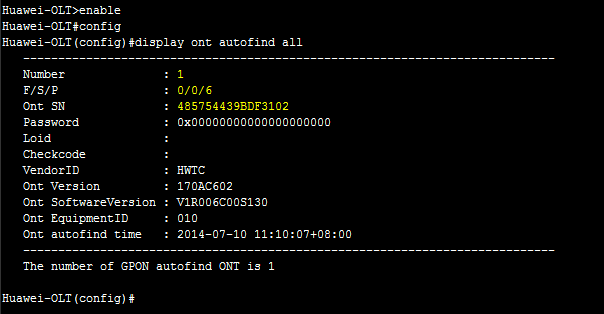
display ont autofind all
Look like bellow format in OLT:
Huawei-OLT>enable
Huawei-OLT#config
Huawei-OLT(config)#display ont autofind all
—————————————————————————-
Number : 1
F/S/P : 0/0/6
Ont SN : 485754439BCV3102
Password : 0x31323334353600000000(123456)
Loid : 123456
Checkcode :
VendorID : HWTC
Ont Version : OT55GAGB VER.Dÿ
Ont SoftwareVersion : V1R1C01SPC021
Ont EquipmentID : EchoLife:HG851
Ont autofind time : 2014-09-27 04:10:07+06:00
—————————————————————————-
The number of GPON autofind ONT is 1
Huawei-OLT(config)#