Delete Huawei ONT from OLT

Delete Huawei ONT from OLT:

Here we show you how to delete Huawei ONT total configuration which we create for ONT registration time. [boxads]

At first we delete service port:

Huawei-OLT(config)#undo service-port 500

################################################################

Now we delete ONT from interface mode:

Huawei-OLT(config)#interface gpon 0/0

Huawei-OLT(config-if-gpon-0/0)#ont delete 6 0
Number of ONTs that can be deleted: 1, success: 1

Huawei-OLT(config-if-gpon-0/0)#

Read more

Register Huawei ONT in Huawei OLT

How to Register Huawei ONT in Huawei OLT:

Today i will show how to register Huawei ONT in a Huawei OLT. Here i use Huawei MA5608T series OLT & EchoLife: HG851 ONT device. So let’s start our configuration part…………….[boxads]

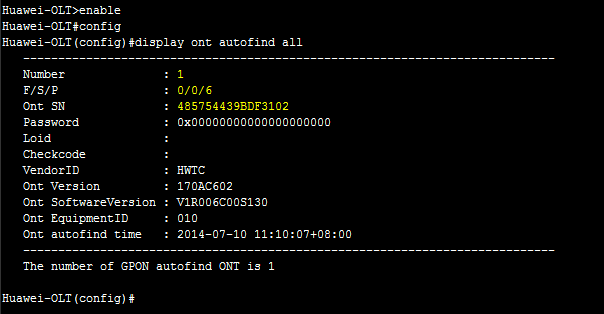
Step-1: At first we search ONT serial number in our OLT discover list option by bellow command:

enable
config t
display ont autofind all

Look like bellow format in OLT:

ont autofind all - Register Huawei ONT
ont autofind all – Register Huawei ONT

Read more

Create Traffic Table in Huawei OLT

Create Traffic Table in Huawei OLT:

[boxads]

Here i will show you how to create traffic table or Bandwidth control list in huawei OLT.

At first login your OLT & go to config mode then apply bellow command, All meaning of that configuration are given also under the configuration.

traffic table ip index 31 name 1Mbps cir 1024 cbs 34768 pir 2048 pbs 67536 priority 4 priority-policy local-Setting

Here: we create traffic table for 1Mbps Bandwidth.

[ index 31= index number
1Mbps= name / description
cir=Committed Information Rate(unit:kbps), here we apply cir=1024 kbps for 1Mbps
cbs=Committed Burst Size(unit:byte), CBS is determined by min (2000+cir x 32)
pir=Peak Information Rate(unit:kbps), This parameter is optional. If the parameter is not specified, it can be obtained by the formula min(2 x cir)
pbs=Peak Burst Size(unit:byte), PBS is determined by min (2000+pir x 32)

Its Look like bellow format in OLT:

Create Traffic Table in Huawei OLT

Read more

Huawei ONT Bandwidth Configure

How to Change Huawei ONT Bandwidth in a service port ?

Today i will show you how to Huawei ONT Bandwidth configure. If you want to increase/decrease BW a specific client/ONT user then you can easily do it by Traffic table. At first login your OLT, then show traffic table index number from your traffic table by bellow command…..[boxads]

Huawei-OLT#display traffic table ip from-index 0

Look like bellow format:

Traffic_Table
Traffic_Table

From traffic table we found TID 6 is configured 1 Mbps traffic policy, which we make before. Now we apply it in a service port 426 that is 512 Kbps assigned now.

Read more

Delete DBA profile in Huawei OLT

Delete DBA profile in Huawei OLT: Today i will discuss how to delete DBA profile in Huawei OLT. Here i work Huawei MA5608T Model OLT. At first login your Huawei OLT & go to config mode then type bellow command. [boxads] Huawei-OLT(config)#dba-profile delete profile-id 12

QoS GPON Configuration

QoS GPON Configuration:

GPON treats QoS explicitly

constant length frames facilitate QoS for time-sensitive applications

[boxads]

5 types of Transmission CONTainers

  • type 1 – fixed BW
  • type 2 – assured BW
  • type 3 – allocated BW + non-assured BW
  • type 4 – best effort
  • type 5 – superset of all of the above
DBA Types
DBA Types

Read more