
Optical Splitter Loss Ratio 1:N

Optical Splitter Loss Ratio 1:N: Fiber Optic Splitters are used to divide the input optical fiber light at a certain ratio and send them to output parts. Optical coupler is an optical device that combines or splits power from optical fibers. [boxads] 1:N Fiber optic Splitter loss ratio chart are given bellow: Fiber optic splitter … Read more

Display ONT info in Huawei OLT

How to display ONT info in Huawei OLT:

Here i will show you how to display ONT info by bellow command……….

[boxads]

At first go to interface mode then type display ont info  ONT id  Port id

look like bellow:

Huawei-OLT(config)#interface gpon 0/0

Huawei-OLT(config-if-gpon-0/0)#display ont info 6 0
—————————————————————————–
F/S/P                                 : 0/0/6
ONT-ID                             : 0
Control flag                       : active
Run state                           : online
Config state                       : normal
Match state                        : match
DBA type                            : SR
ONT distance(m)              : 1267
ONT battery state              : not support
Memory occupation          : –
CPU occupation                 : –
Read more

Display Service-port by Filtering Huawei OLT

How to see Service-port by Filtering Huawei OLT:

At first login your Huawei OLT and go to config mode. Then type service-port related bellow command.

[boxads]

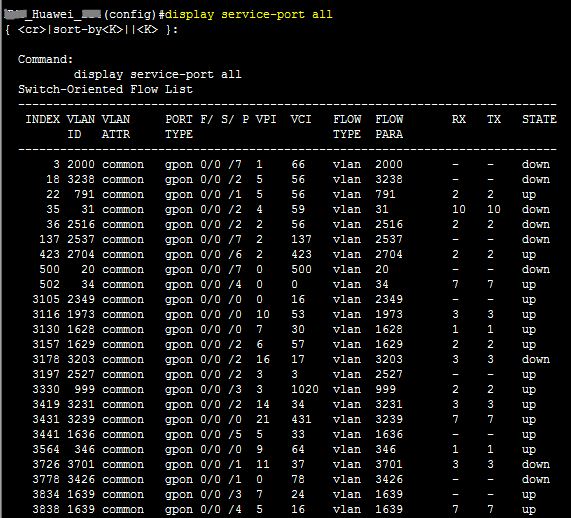
Huawei-OLT(config)#display service-port all

It will show all service port by INDEX/Service-port wise in your OLT.

display service-port all

Huawei-OLT(config)#display service-port all sort-by port

Read more

Config state failed in Huawei ONT

Config state failed in Huawei ONT:

Today i will discuss how to solved Config state failed problem in Huawei ONT. When you found Config state : failed status in Huawei ONT by display ont info, then which type step taken you ? Don’t  worry i will show how to solved this problem………………. [boxads]config state failed

config state failed

This types of problem occur if line-profile should not configured properly, such as same GEM index is apply same PON port in different line-profile. Now show bellow step to solved that problem.

step-1: At first show all service port in that pon port & copy it.

Huawei-OLT(config)#display service-port port 0/4/2 ont 8

service-port
service port

Now delete all service port by…………..

Read more

Huawei OLT Configuration backup procedure

Huawei OLT Configuration backup procedure

Today I will discuss how to backup configuration in Huawei OLT. There are different mode we can backup Huawei OLT Configuration, such as ftp, sftp, tftp, xmodem mode etc. Also we can do it GUI/CLI mode. In GUI mode we can use Huawei iManager U2000 NMS server/client. In CLI mode we can use Terminal software XshellPuTTY  etc. today i will show in CLI mode. So let’s go our configuration part. [boxads]

Huawei OLT Configuration backup procedure:

Huawei-OLT(config)#backup ?
———————————————
Command of privilege Mode:
———————————————
bios                  BIOS file
configuration         Configuration file
data                  Database file
language              Host Multi-language resource
program               Host program
sip-srvlogic          SIP-Srvlogic file
voice                 Voice file

Huawei-OLT(config)#backup configuration ?
———————————————
Command of privilege Mode:
———————————————
ftp                   Ftp mode
sftp                  Sftp mode
tftp                  Tftp mode
xmodem                Xmodem mode

Huawei-OLT(config)#backup configuration tftp ?
———————————————
Command of privilege Mode:
———————————————
ServerIpAddress<I><X.X.X.X>     Server’s IP address

Huawei-OLT(config)#backup configuration tftp 192.168.1.50 ?
———————————————
Command of privilege Mode:
———————————————
filename<S><Length 1-128>       Load file name

Huawei-OLT(config)#backup configuration tftp 192.168.1.50 OLT-configuration.cfg ?
———————————————
Command of privilege Mode:
———————————————
<cr>                  Please press ENTER to execute command

Read more