Today i discuss how to Huawei switch bandwidth limit Configure. will At first login your Huawei switch then follow bellow command. In this case i will show you how 1 MB Bandwidth limit configure in a huawei switch port.[boxads]
Configuration example:
system-view interface Ethernet 0/0/1 qos lr inbound cir 1024 cbs 16000000 qos lr outbound cir 1024 cbs 16000000
Networking Requirements:
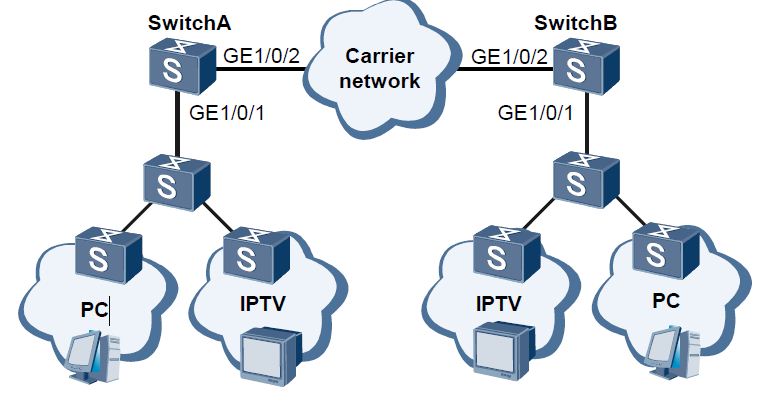
As shown in Figure, common Internet access users (using PCs) and IPTV users (using IPTV terminals) connect to the carrier network through Switch A and Switch B and communicate with each other through the carrier network. [boxads]
It is required that packets of PCs and IPTV terminals are tagged VLAN 2 and VLAN 3 when the packets are transmitted through the carrier network.
selective QinQ
Configuration Roadmap:
The configuration roadmap is as follows:
1. Create VLANs on Switch A and Switch B.
2. Configure types of interfaces on Switch A and Switch B, and add the interfaces to corresponding VLANs.
3. Configure selective QinQ on interfaces of Switch A and Switch B.
How to Configure QinQ on Huawei Switch port/interface:
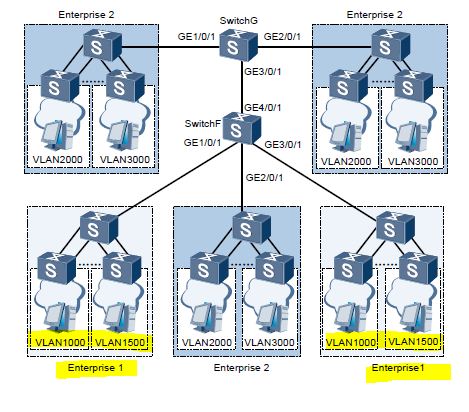
Today I will show how to configure QinQ in Huawei Switch port/interface. As shown in Figure, there are two enterprises on the network, namely, Enterprise 1 and Enterprise 2. Enterprise 1 has two office locations; Enterprise 2 has three office locations. The office locations of the two enterprises access SwitchG or SwitchF of the ISP network.
[boxads]
The network of Enterprise 1 is divided into VLAN 1000 to VLAN 1500; the network of Enterprise 2 is divided into VLAN 2000 to VLAN 3000. It is required that employees in the same VLAN can communicate with each other through the ISP network but the two enterprises are isolated from each other.
Networking diagram for QinQ on Huawei switch
Configuration Roadmap:
The configuration roadmap is as follows:
1. Create VLAN 10 and VLAN 20 on SwitchF; create VLAN 20 on SwitchG.
2. Configure GE 1/0/1, GE 2/0/1, and GE 3/0/1 of SwitchF as QinQ interfaces.
3. Configure GE 1/0/1 and GE 2/0/1 of SwitchG as QinQ interfaces.
4. Add GE 4/0/1 of SwitchF and GE 3/0/1 of SwitchG to VLAN 20 in tagged mode.
How to configure Eth-Trunk on Huawei Switch port/interface:
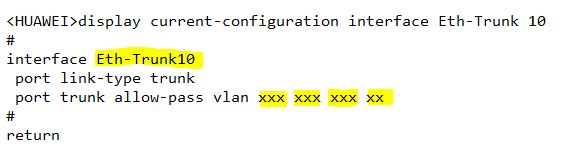
Today i will show you how to configure Eth-Trunk on Huawei Switch port/interface.
Here i use one side GigabitEthernet 0/0/15 & 0/0/16 interface & other side GigabitEthernet 0/0/2 & 0/0/3, And Eth-Trunk 10. [boxads]
Step-1: At first login your switch & go to system-view mode & follow bellow configuration.
Vlan mapping Huawei Switch: Today I will show you how to configure Vlan mapping Huawei Switch / Vlan converting from one Vlan to another vlan. Let’s go…………. [boxads] Step-1: At first login your switch & create your desired vlan in Vlan databae which you use. Step-2: Then go to interface mode & follow bellow example. … Read more
Today i will discuss how to configure a new huawei switch, so lets go our Huawei Switch Configuration Tutorial part…………[boxads]
Procedure:
Step 1: Connect the COM port on the PC and the console port on the switch by a cable.
Step 2: Power on all devices to perform a self-check.
Step 3: Run the terminal emulation program on the PC, setting the communication parameters as follows:
-Baud rate: 9600 bps
-Data bit: 8
-Stop bit: 1
-Parity: none
-Flow control: none