Huawei OLT Board List details

Huawei OLT Board List

Today i will discuss about Huawei OLT Board. Their are many type of board in Huawei OLT, such as control board, service board, Power board etc. [boxads]

Here is the Huawei MA5603T OLT running board example

Huawei olt board
Huawei olt board

Bellow are the list of Huawei OLT Board:

ADI        32-channel ADSL2+ over ISDN service board
ADK        64-channel ADSL2+ over ISDN service board
ADL        32-channel ADSL2+ over POTS service board
ADP        64-channel ADSL2+ over POTS service board
ADQ        64-channel ADSL2+ over ISDN service board
ASP        64-channel VoIP POTS service board
H801MPWC   DC Power Interface board
H801MPWD   AC Power Interface board
H801MPWE   DC Power Interface board
H801PRTA   DC Power Interface board
H801PRTE   DC Power Interface board
H801PRTG   DC Power Interface board
H801SCUN   Control board

Read more

Show all Registered Huawei ONT Serial Number

Show all Registered Huawei ONT Serial Number in single PON port:

Today i will show how to Display all Registered Huawei ONT Serial Number in single PON port.

[boxads]

Login & go to interface mode & type bellow command.

Huawei-OLT(config)#interface gpon 0/0

Huawei-OLT(config-if-gpon-0/0)#display ont info 3 all 

[Note: Here it show all Registered ONT Serial Number in PON port 3.]

Read more

Display Huawei ONT Configuration in Huawei OLT

Display Huawei ONT Configuration in Huawei OLT:

Today i will show how to display huawei ONT Configuration in Huawei OLT.

At first login your OLT & go to interface mode and type bellow command.

[boxads]

Huawei-OLT(config-if-gpon-0/0)#display ont info 3  1

It you show all configuration status of a single ont, Which ONT id is 1 & also show Line profile & Service profile.

[Note: here 3= Pon Port & 1=ONT ID]

Look Like bellow format in OLT:

Huawei-OLT(config-if-gpon-0/0)#display ont info 3 1
—————————————————————————–
F/S/P                      : 0/0/3
ONT-ID                  : 1
  Control flag           : active
  Run state               : online
  Config state           : normal
  Match state           : match
DBA type               : SR
ONT distance(m)        : 1094
ONT battery state       : not support
Memory occupation   : –
CPU occupation          : –
Temperature             : –
Authentic type          : SN-auth+password-auth
SN                               : 485754B5FVBB002 (HWTC-9BDBB002)
Password                   : 0x31323334353600000000(123456)
Management mode         : OMCI
Software work mode       : normal
Isolation state                   : normal
ONT IP 0 address/mask   : 10.0.1.212/8
Description                  : ONT_Description
Last down cause         : dying-gasp
Last up time                : 2014-08-26 17:15:50+08:00
Last down time          : 2014-08-26 17:14:54+08:00
Last dying gasp time      : 2014-08-26 17:14:54+08:00
ONT online duration     : 13 day(s), 6 hour(s), 49 minute(s), 8 second(s)
Type C support               : Not support

Read more

BGP Multihoming with Two Different ISP

BGP Multihoming:

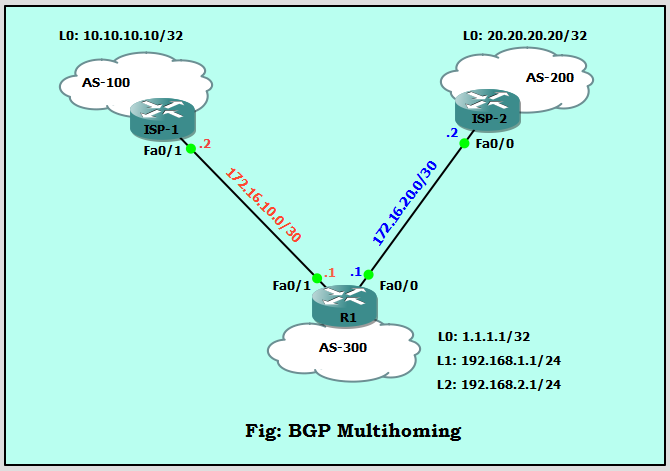
[boxads]Today i will discuss how to configure BGP Multihoming with Two Different Service Providers environment. When you connect your network to two different Internet service providers (ISPs), it is called multihoming. Multihoming provides redundancy and network optimization. It selects the ISP which offers the best path to a resource. So let’s follow our diagram:

BGP Multihoming
BGP Multihoming

Here Router R1 upstream are connected to two ISP’s. one is ISP-1 and AS is 100, another is ISP-2 and it’s AS is 200. Now let’s go our BGP Multihoming configuration part.

Read more

Default username and password for Huawei echolife ONT

Default username and password for Huawei echolife HG8240/HG8245/HG8247 ONT:

Today i will discuss about default username and password for Huawei echolife HG8240/HG8245/HG8247 ONT. [boxads]

Question-1: What is the default user name and password for Huawei ont ?

Answer: By default, administrator mode,

Username: telecomadmin, Password: admintelecom,

Common user, User name: root, Password: admin

Question-2: What is the default IP address and Subnet Mask of huawei ont ?
Answer: IP address: 192.168.100.1, Subnet mask: 255.255.255.0

Question-3: If we want to connect a PC with Huawei ONT, how to set IP address and subnet mask of the PC?
Answer: Set the IP address of the PC to be in the same subnet as the LAN IP address of the HG8240/HG8245/HG8247.

Read more

eBGP load balancing with single-homed BGP environment

eBGP load balancing :

[boxads]Today i will discuss how to configure eBGP load balancing with single-homed BGP environment. So lets go…….. If we look our topology we see here two ISP router are connected through two link.  Also this two router are in different autonomous system. Router R1 autonomous system is 21 & Router R2 autonomous system is 22.

Router R1 loopback address: 1.1.1.1  & 11.11.11.11

Router R2 loopback address: 2.2.2.2 & 12.12.12.12

Also this loopback0 are connected via static route & loopback1 connected via eBGP.

eBGP load balancing Network Diagram:

eBGP load balancing
eBGP load balancing

This scenario shows how to achieve load balancing when there are multiple (up to a maximum of six), equal-cost links. The links are terminated in one router at a local autonomous system (AS) and in another router at a remote AS in a single-homed BGP environment. Now we will be start our configuration part.

Router R1 Configuration:

Basic IP Configure:

R1#configure terminal
R1(config)#interface loopback 0
R1(config-if)#ip address 1.1.1.1 255.255.255.255
R1(config)#interface loopback 1
R1(config-if)#ip address 11.11.11.11 255.255.255.0
R1(config-if)#int fa0/0
R1(config-if)#ip address 10.10.0.1 255.255.255.0
R1(config-if)#no shutdown
R1(config-if)#int fa0/1
R1(config-if)#ip address 10.10.1.1 255.255.255.0
R1(config-if)#no shutdown
R1(config-if)#

Read more