Configure H.248 VoIP Service in ZTE OLT

Configure H.248 VoIP Service in ZTE OLT:

[boxads]

Today i will discuss how to Configure H.248 VoIP Service in ZTE OLT.

Prerequisites:

  • Make sure that the network device works normally.
  • The GPON card works normally.
  • The corresponding VoIP resource data is configured on the SS.
  • The in-band NM IP address of the ZXA10 C220 is configured.
  • Log in to the ZXA10 C220 through HyperTerminal or Telnet.

Networking Diagram:

Below figure shows the H.248 VoIP service networking diagram.

Configure H.248 VoIP Service networking diagram

Data Configuration:
Below table describes the H.248 VoIP service data configuration.

H.248 VoIP Service data configuration
H.248 VoIP Service data configuration 2

Read more

Configure SIP VoIP Service ZTE OLT

Configure SIP VoIP Service in ZTE OLT:

[boxads]

Today i will discuss how to Configure SIP VoIP Service in ZTE OLT.

Prerequisites:

  • Make sure that the network device works normally.
  • Make sure that the GPON card works normally.
  • The corresponding VoIP resource data is configured on the SIP server.
  • Log in to the ZXA10 C220 through HyperTerminal or Telnet.

Networking Diagram:
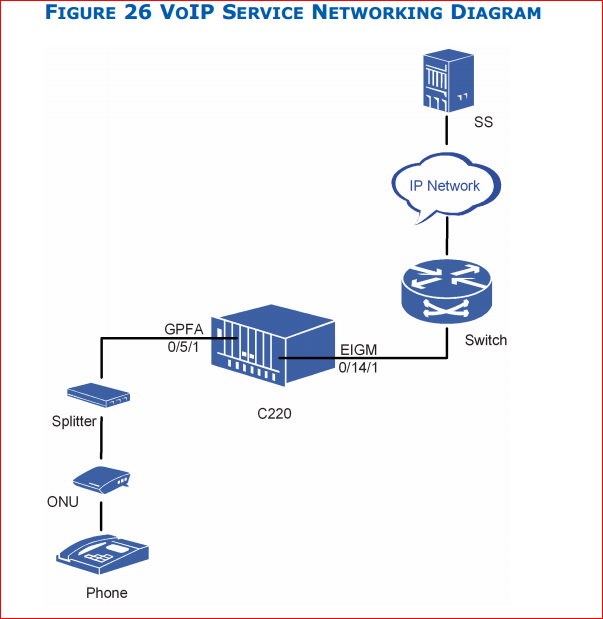
Bellow figure shows the SIP VoIP service networking diagram.

Configure SIP VoIP Service networking diagram

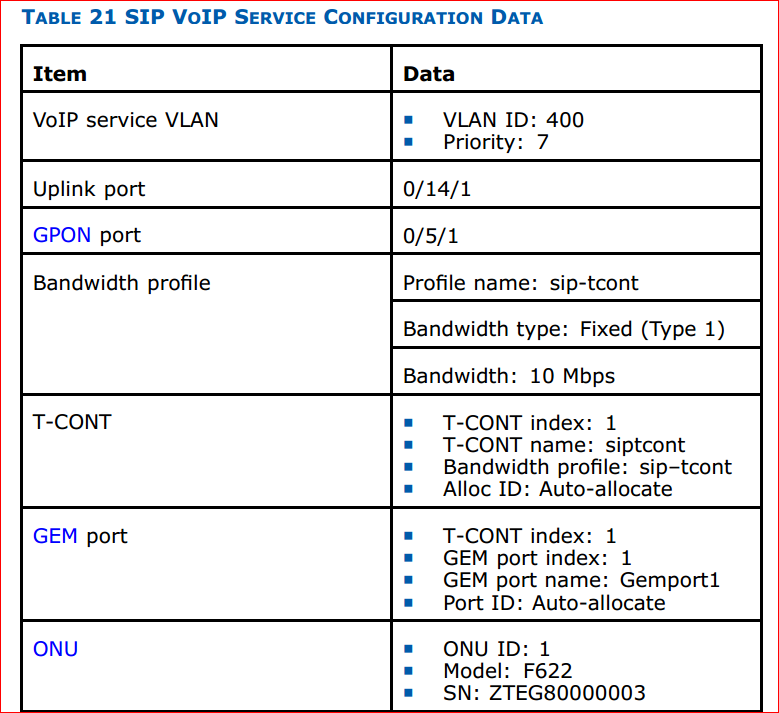
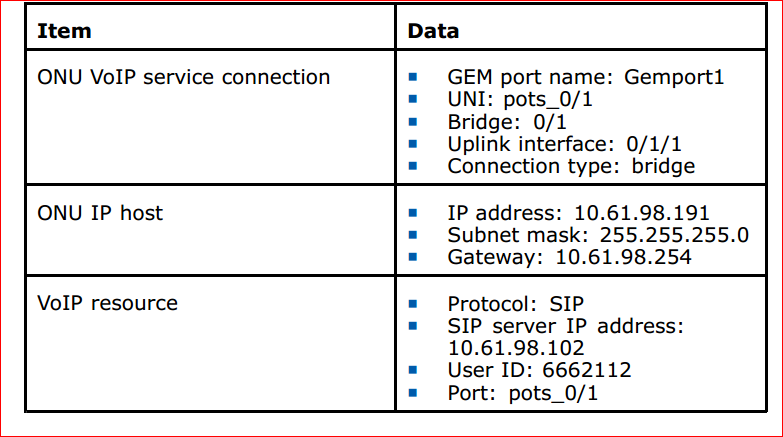
Configuration Data:
Below Table describes the SIP VoIP service configuration data.

Configure SIP VoIP Service configuration data 1Configure SIP VoIP Service configuration data

Read more

Configure CDR Parameters in ZTE OLT

Configure CDR Parameters in ZTE OLT

[boxads]

Today i will discuss about how to Configure CDR Parameters in ZTE OLT.

Prerequisites:

  • Make sure network device works normally.
  • Log in to the ZXA10 C220 through HyperTerminal or Telnet.

Context:

Table 16 describes ranges and default values of CDR global parameters.

Configure CDR Parameters in ZTE OLT 1Configure CDR Parameters in ZTE OLT 2

To configure the CDR parameters, perform the following steps:

1. Use the configure terminal command to enter global configuration mode.
2. Use the iptv cdr enable command to enable global CDR function.
3. Use the iptv cdr max-records command to configure CDR maximum records.
4. Use the iptv cdr report command to report CDR manually.
5. Use the iptv cdr report-interval command to configure CDR automatic report interval.
6. Use the iptv cdr report-threshold command to configure CDR automatic report threshold.
7. Use the iptv cdr create-period command to configure CDR generating period.
8. Use the iptv cdr deny-right command to enable or disable CDR function when user right is deny.
9. Use the iptv cdr prw-right command to enable or disable CDR function when user right is preview.
10. Use the iptv cdr prw-overcount command to enable or disable CDR function when user preview count is over limit.
11. Use the iptv cdr clear command to clear CDR record.
12. Use the show iptv cdr command to query CDR configuration.

Read more

CAC Configure in ZTE OLT

CAC Configure in ZTE OLT

[boxads]

Today i will discuss how to CAC Configure in ZTE OLT.

Prerequisites:

  • Make sure that the network device works normally.
  • Make sure that the data service is configured.
  • Make sure that theIPTV package is configured.
  • Log in to the ZXA10 C220 through HyperTerminal or Telnet.

Context:

To configure the CAC, perform the following steps:

1. Use the configure terminal command to enter global configuration mode.
2. Use the iptv cac command to enable global CAC function.
3. Use the interface command to enter the GPON-ONU interface configuration mode.
4. Use the iptv service start command to start IPTV service on the interface.
5. Use the iptv right-mode command to enable or disable the authentication on the interface.

Note: By default, the authentication enabled.

6. Use the iptv-mode command to configure interface right mode.

Note: The default right mode is package.

Read more

IPTV Package configure in ZTE GPON OLT

IPTV Package configure in ZTE GPON OLT

[boxads]

Today i will discuss about how to IPTV Package configure in ZTE GPON ZXA10 C220 OLT.

Prerequisites:

  • Make sure that the network device works normally.
  • Make sure that the multicast source exits in the uplink network.
  • Make sure that the MVLAN is configured.
  • Log in to ZXA10 C220 through HyperTerminal or Telnet.

Context:

To configure the IPTV package, perform the following steps:

1. Use the configure terminal command to enter global configuration mode.
2. Use the iptv channel mvlan group command to configure IPTV channels.
3. Use the iptv view-profile command to configure preview profile.

preview profile parameters:

preview profile parameters

4. Use the iptv channel view-profile command to apply preview profile to channel.
5. Use the iptv packgae name command to create IPTV package.
6. Use the iptv packgae channel command to configure IPTV package channels.

Read more

MVLAN Configure in ZTE ZXA10 C220 OLT

MVLAN Configure in ZTE ZXA10 C220 OLT

[boxads]

Today i will discuss how to MVLAN Configure in ZTE ZXA10 C220 OLT.

Prerequisites:

  • Make sure that the network device works normally.
  • Make sure that the multicast source exits in the uplink network.
  • Make sure that the data service is configured.
  • Log in to the ZXA10 C220 through HyperTerminal or Telnet.

Context:

To configure the MVLAN parameters, perform the following steps:

1. Use the configure terminal command to enter global configuration mode.
2. Use the igmp mvlan command to configure MVLAN
3. Configure MVLAN groups process mode.

Use the igmp mvlan enable command to configure that the MVLAN processes multicast packets with IGMP protocol.
Use the igmp mvlan disable command to configure that the MVLAN transparently transmits multicast packets.

4. Use the igmp mvlan work-mode command to configure MVLAN work mode.

Note: In IGMP snooping mode, pre-join and static join functions are invalid.

5. Use the igmp mvlan group command to configure MVLAN group
6. Use the igmp mvlan group-filter command to configure MVLAN group management.

Note:

  • When MVLAN group management is enabled, IGMP join packets must check whether the group is configured. The configured group is management group.
  • When MVLAN group management is disabled, IGMP join packets do not check whether the group is configured. The learned group is dynamic group.
  • When span-VLAN is enabled, MVLAN group-filter must be enabled.

7. Use the igmp mvlan group bandwidth command to configure multicast bandwidth.
8. Use the igmp mvlan max-group command to configure MVLAN maximum group number.
9. Use the igmp mvlan group pre-join command to configure pre-join function.
10. Use the igmp mvlan source-port command to configure MVLAN source port.
11. Use the igmp mvlan receive-port command to configure MVLAN receiving port.
12. Use the igmp mvlan static-port command to configure MVLAN static receiving port.
13. Use the igmp mvlan host-ip command configure MVLAN proxy IP address in IGMP proxy mode.
14. Use the igmp mvlan group command to query MVLAN configuration.

Read more