ZTE ZXA10 C220 Epon OLT Specification

ZTE ZXA10 C220 Epon OLT Specification

[boxads]

Today i will discuss about ZTE ZXA10 C220 Epon OLT Specification. C220 is big/middle OLT equipment with high density, high bandwidth and scalable office end equipment of passive optical access.

The ZXA10 C220 xPON uniform access platform, reflects the evolution trend of optical access networks, suitable for all kinds of FTTx deployment pattern, provides the HSI, VoIP, TDM, IPTV, CATV, move under 2 g / 3 g, WiFi, etc all fusion access control and management of the business, as well as the QoS and the safety reliability of the telecommunication level security.

ZTE ZXA10 C220 Epon-Gpon OLT Specification
ZTE ZXA10 C220 Epon OLT Specification

Specifications:

capacity
GE/10GE/E1/T1/STM-1/OC3
PON interface EPON/GPON/10G EPON
resolution ratio 1:64/1:128
transmission distance 20km
dimension 482.6 mm(W) x265.9 mm(H) x 353 mm(L)
voltage -48V (-38V ~ -57V), DC
operating temperature -5°C ~45°C
Operating humidity 5% ~95%
consumption EPON:<400 W

GPON:<450 W

Read more

ZTE ZXA10 C320 GPON OLT Specification

ZTE ZXA10 C320 GPON OLT Specification:

[boxads]

Today i will discuss about ZTE ZXA10 C320 GPON OLT Specification. ZTE C320 OLT, a small size, full-service optical access convergent platform, provides carrier class QoS and reliable network to meet the requirements for small-scale implementation of FTTx services. The ZXA10 C320 can share line cards with ZXA10 C300 (ZTE existing 10U-high large-capacity OLT) and this compact OLT is able to provide up to 2,048 (splitting ratio 1:64) ONTs access.

Main Parameters:

  • 2U high,horizontal plug card,front access
  • 19-inch rack with 4 slot
  • System Capacity: 2 service card slots(GPON/EPON/P2P/10G EPON/XG-PON1)
  • Up to 2048 GPON subscribers access
  • Up to 2×10GE uplink
  • Physical transmission distance: 20Km
  • Management interface: CLI ( Telnet or RS232), SSH, SNMP V1/2/3, SNMP proxy
ZTE ZXA10 C320 GPON OLT Specification

Key Features:

  • Compatible with ITU G.984.x
  • Support ITU-T G.987.x and G.988
  • Support Optical Laser Supervising (OLS)
  • Physical reach: 20~60km
  • GPON Transceiver power: Class B+ and Class C+
  • XGPON Transceiver power: N1, N2, E1 and E2
  • Support Type B and Type C protection
  • Support SR-DBA and NSR-DBA
  • Downstream and upstream FEC
  • Support AES128 encryption
  • Support SCB (Single Copy Broadcast)
  • Full G.984.4 OMCI Stack
  • Support migration to NG PON2
  • 4K VLAN number, IEEE 802.1q, 1:1/N:1 VLAN, VLAN translation, VLAN Stacking (QinQ )
  • VRF, ARP agent/ proxy
  • STP/RSTP/MSTP
  • Link aggregation IEEE 802.3ad
  • DHCP server, DHCP Relay ( option 60/82), DHCP proxy, DHCPv6 L2/L3 relay agent
  • IPv4 and IPv6 dual stack
  • 1588v2, 1PPS+TOD, SynE, BIT/HZ
  • L3 routing: IPv4/6 Statistic routing, OSPFv2, BGPv4, RIP V1/V2, ISIS
  • L2- L4 flow classification and ACL
  • IGMP V1/2/3, IGMP/MLD snooping/proxy/router
  • 256 Multicast VLANs
  • IGMP pre-join and fast leave

Read more

ZTE ZXA10 C300 GPON OLT Specification

ZTE ZXA10 C300 GPON OLT Specification:

[boxads]

Today i will discuss about ZTE ZXA10 C300 GPON OLT Specification. ZTE ZXA10 C300 GPON OLT is the world’s first future-proof and largest capability optical access platform, is developed with mass optical access roll-out as well as economy in mind. Its powerful functions and high performance make mass FTTx roll-out easier than ever before. It provides the stable technology and service platform for full-service access and management such as HSI, VoIP, TDM, IPTV, and mobile back-haul.

ZTE ZXA10 C300 GPON OLT

Main Parameters:

  • 10U high, vertical plug card,front access
  • 19-inch rack with 21 slot
  • System Capacity: 14 service card slots(GPON/EPON/P2P/10G EPON/XG-PON1)
  • Up to 16384 GPON subscribers access
  • Up to 16×10GE uplink
  • Physical transmission distance: 20Km~60Km
  • Management interface: CLI ( Telnet or RS232), SSH, SNMP V1/2/3, SNMP proxy

Read more

Juniper Remote Access Configuration

Juniper Remote Access Configuration

Today i will discuss about Juniper Remote Access Configuration Example. How to enable FTP, SSH, Telnet, http etc…service in Juniper Router/Switch. [boxads]

Enable FTP Service:

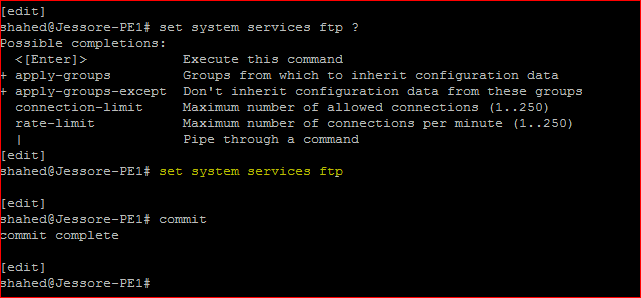
shahed@Jessore-PE1# set system services ftp ?
Possible completions:
  <[Enter]>            Execute this command
+ apply-groups         Groups from which to inherit configuration data
+ apply-groups-except  Don’t inherit configuration data from these groups
  connection-limit     Maximum number of allowed connections (1..250)
  rate-limit           Maximum number of connections per minute (1..250)
  |                    Pipe through a command
[edit]
shahed@Jessore-PE1# set system services ftp

[edit]
shahed@Jessore-PE1# commit
commit complete

By default, the router or switch supports a limited number of simultaneous FTP sessions and connection attempts per minute. You can include either or both of the following statements to change the defaults:

  • connection-limit limit—Maximum number of simultaneous connections per protocol (IPV4 and IPv6). The range is a value from 1 through 250. The default is 75. When you configure a connection limit, the limit is applicable to the number of sessions per protocol (IPv4 and IPv6). For example, a connection limit of 10 allows 10 IPv6 FTP sessions and 10 IPv4 FTP sessions.
  • rate-limit limit—Maximum number of connection attempts accepted per minute (a value from 1 through 250). The default is 150.When you configure a rate limit, the limit is applicable to the number of connection attempts per protocol (IPv4 and IPv6). For example, a rate limit of 10 allows 10 IPv6 FTP session connection attempts and 10 IPv4 FTP session connection attempts.

You can use passive FTP to access devices that accept only passive FTP services. All commands and statements that use FTP also accept passive FTP. Include the ftp statement at the [edit system services] hierarchy level to use either active FTP or passive FTP.

To start a passive FTP session, use pasvftp (instead of ftp ) in the standard FTP format (ftp://destination). For example:

request system software add pasvftp://name.com/jinstall.tgz

You cannot include the ftp statement on routers or switches that run the Junos-FIPS software. We recommend that you do not use the finger service in a Common Criteria environment.

Juniper Remote Access Configuration Enable FTP service

Enable Telent Service:

[edit]
shahed@Jessore-PE1# set system services telnet ?
Possible completions:
  <[Enter]>            Execute this command
+ apply-groups         Groups from which to inherit configuration data
+ apply-groups-except  Don’t inherit configuration data from these groups
  connection-limit     Maximum number of allowed connections (1..250)
  rate-limit           Maximum number of connections per minute (1..250)
  |                    Pipe through a command
[edit]
shahed@Jessore-PE1# set system services telnet

Read more

All useful commit command Juniper router

All useful commit command Juniper router

Today i will discuss about all useful commit command Juniper router, which are used in different purpose.

[boxads]

The Junos candidate configuration file is only the “proposed” configuration; your device does not use any of this configuration until you activate this candidate configuration using the commit command.

When you have definitely made all your changes, done all your checks, and are ready to make your candidate the active configuration running the device, enter the commit command:

To activate any configuration you must type commit. Otherwise the configuration will be not execute. Below describe the type of commit operation:

Example:

Use commit to activate configuration changes:

[edit]
shahed@Jessore-PE1# commit
commit complete

As part of the commit process, Junos checks basic syntax and semantics. For example, the software makes sure that a policy has been defined before it is referenced. If any syntax or semantic problems are found, the commit command returns an error:

You must fix all mistakes before the candidate (or any part of the candidate) can become active. When the activation is done, you see the commit complete message.

If multiple REs are installed, use commit synchronize

[edit]
shahed@Jessore-PE1# commit synchronize
commit complete

Use commit check to confirm syntax:

[edit]
shahed@Jessore-PE1# commit check
configuration check succeeds

Read more