
Reset Cisco Router password

Reset Cisco Router password:

Today i will discuss how to reset Cisco Router password. so follow bellow steps………..

[boxads]

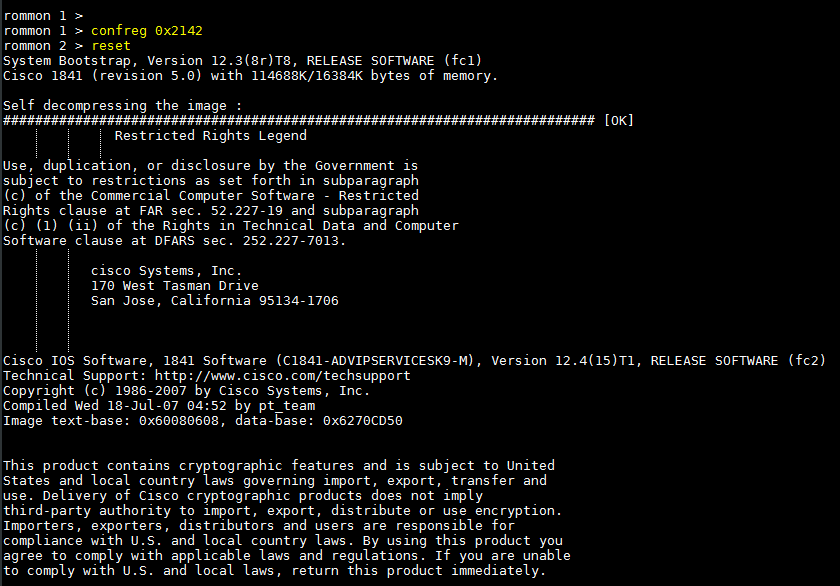
Step-1.  Reboot your router first, when it rebooting attempt to break into ROM Monitor (ROMmon) by issuing the break sequence (usually Ctrl and break from the Hyperterminal) from a console connection. Refer to: Cisco Standard Break Key Combinations You should see this ROMmon prompt:

rommon 1>

Step-2.  Change the configure register value to ignore the startup configuration by issuing the confreg command, as shown in this example:

rommon 1> confreg 0x2142

Step-3.  To reload the router, issue the reset command, as shown in this example:

rommon 2> reset
Reset Cisco Router password

Read more

Cisco Router factory-default

Cisco Router factory-default:

Today i will discuss how to do Cisco Router factory-default or initial configuration mode. we configure it two way, Erase nvram and erase startup-config”, So lets follow bellow procedure………..[boxads]

#.To erase the configuration file, use erase nvram: command.

Router> en
Router#erase nvram:

Reload the router by reload command.

Router# reload

Read more

How to Reset a Cisco Switch to Factory Default

How to Reset a Cisco Switch to Factory Default

Are you find cisco switch factory default command?

Don’t worry please follow bellow step. [boxads]

To delete total configuration from switch:

Erase startup-config:

Example:
Switch#erase startup-config
Erasing the nvram filesystem will remove all configuration files! Continue? [confirm]
[OK]
Erase of nvram: complete
Switch#reload

To delete All VLAN from switch:

Enter the following commands in the privileged mode:

Delete flash:vlan.dat:

Read more

VLAN Based Traffic Shaping Cisco Switch

VLAN Based Traffic Shaping:

Today i will discuss how to configure VLAN based traffic shaping on cisco Catalyst ME3400 switch. Suppose you have 4 vlan [21,22,23,24] on a trunk port & you want to bandwidth shaping specific vlan 21 & 22. Here we declare 5Mbps BW for Vlan 21 & 2Mbps BW for Vlan 22. [boxads]

You can enable bandwidth shaping on an interface (or sub-interface) in three easy steps. Just remember: class, policy & interface.

Class:

At first you need to create a class map for those Vlan. Here we create vlan21 & vlan22 as a class map.

class-map match-all vlan21
 match vlan  21
class-map match-all vlan22
 match vlan  22

policy:

Now it’s time to define our policy map. In this case, we’re going to take any traffic that matched the vlan21 & vlan22 class (which, as you remember, is all traffic) and apply a shaping policy to it. Also we create subvlan & mainvlan policy map.

Read more

Configure bandwidth limit cisco switch

How to Configure bandwidth limit cisco switch / bind switch port bandwidth

Today i will discuss how to configure bandwidth limit cisco switch port. At first create policy map then apply it into port which port you bind specific bandwidth. In this case i will show you how to configure 1 MB Bandwidth limit in a switch port.[boxads]

Go to config mode by: conf t command then follow bellow command.

Policy Map for Input traffic:

policy-map 1MBps
class class-default
police cir 1048576 bc 1000000
conform-action transmit
exceed-action drop

Read more

Cisco Switch Security Configuration

Cisco Switch Security Configuration

For security reason one password is used for the enable password and the other will later be assigned to the console port. [boxads]

SWITCH(config)#enable secret  [password]

SWITCH(config)#username admin password [password]

A password should be required to access the console line.  Even the basic user EXEC mode can provide significant information to a malicious user. In addition, the VTY lines must have a password before users can access the switch remotely.

Read more