
Cisco Switch Port Security Configuration

Cisco Switch Port Security Configuration

Today I will discuss about Cisco Switch Port Security issue. Layer 2 interfaces on a Cisco switch are referred to as ports. A switch that does not provide port security allows an attacker to attach a system to an unused, enabled port and to perform information gathering or attacks. A switch can be configured to act like a hub, which means that every system connected to the switch can potentially view all network traffic passing through the switch to all systems connected to the switch. Thus, an attacker could collect traffic that contains usernames, passwords or configuration information about the systems on the network.

[bodyads]

Cisco Switch Port Security limits the number of valid MAC addresses allowed on a port. All switch ports or interfaces should be secured before the switch is deployed. In this way the security features are set or removed as required instead of adding and strengthening features randomly or as the result of a security incident. Note that port security cannot be used for dynamic access ports or destination ports for Switched Port Analyzer. Still, use port security for active ports on the switch as much as possible.

The following Cisco Switch Port Security examples show the commands to shut down a single interface or a range of interfaces:

Single interface:
Switch(config)# interface fastethernet 0/1
Switch(config-if)# shutdown

Range of interfaces:
Switch(config)# interface range fastethernet 0/2 – 8
Switch(config-if-range)# shutdown

The administrator can enable aging for statically configured MAC addresses on a port using the switchport port-security aging static command. The aging time command (e.g., switchport port-security aging time time) can be set in terms of minutes. Also, the aging type command can be set for inactivity (e.g., switchport port-security aging type inactivity), which means that the addresses on the configured port age out only if there is no data traffic from these addresses for the period defined by the aging time command. This feature allows continuous access to a limited number of addresses.

The following Cisco Switch Port Security example shows the commands for restricting a port statically on a Catalyst 3550 switch:

Switch(config-if)# switchport port-security
Switch(config-if)# switchport port-security violation shutdown
Switch(config-if)# switchport port-security maximum 1
Switch(config-if)# switchport port-security mac-address 0000.02b0.0388
Switch(config-if)# switchport port-security aging time 10
Switch(config-if)# switchport port-security aging type inactivity
Read more

Errdisable reason and recovery procedure

Errdisable reason and recovery procedure:

 This document defines the errdisabled reason & describes how to recover from it, and provides examples of errdisable recovery. [boxads]

Note: The port status of err-disabled displays in the output of the show interfaces interface_number status command.

Function of Errdisable:

When a switch port is error disabled state, it is effectively shut down and no traffic is sent or received on that port. The port LED is set to the color orange and, when you issue the show interfaces command, the port status shows err-disabled. bellow is an example of  error-disabled port status looks like from the command-line interface (CLI) of the switch:

SW1#show interfaces fastEthernet 0/1 status 

Port    Name       Status       Vlan       Duplex  Speed Type
Fa0/1              err-disabled 100          full   1000 1000BaseSX

Or, if the interface has been disabled because of an error condition, you can see messages that are similar to these in both the console and the syslog:

%SPANTREE-SP-2-BLOCK_BPDUGUARD: 
   Received BPDU on port fastEthernet0/1 with BPDU Guard enabled. Disabling port.
%PM-SP-4-ERR_DISABLE: 
   bpduguard error detected on Fi0/1, putting Fi0/1 in err-disable state

This message show when a host port receives the  (BPDU) bridge protocol data unit. The actual message depends on the reason for the error condition.

Read more

Configuring Q-in-Q vlan tunnels on cisco Switch port

Configuring Q-in-Q vlan tunnels on cisco Switch port: Today i will discuss how to Configuring Q-in-Q vlan tunnels in cisco switch. At first login your Switch then apply bellow command. Here i use FastEthernet 0/1 interface. [boxads] conf t interface FastEthernet 0/1 description “your description here” port-type nni switchport access vlan 92               switchport mode … Read more

Cisco Switch VLAN Security

Cisco Switch VLAN Security

Today I will discuss about Cisco Switch VLAN Security issue.  A Virtual Local Area Network (VLAN) is a broadcast domain. All members of a VLAN receive every broadcast packet sent by members of the same VLAN, but they do not receive packets sent by members of a different VLAN. All members of a VLAN are grouped logically into the same broadcast domain independent of their physical location. Adding, moving or changing members is achieved via software within a switch. Routing is required for communication among members of different VLANs.[boxads]

The next subsections describe the vulnerabilities and corresponding counter measures for the following areas: VLAN 1, Private VLAN, VTP, Trunk Auto-Negotiation, VLAN Hopping and Dynamic VLAN Assignment.

  • 1. VLAN1

Cisco switches use VLAN 1 as the default VLAN to assign to their ports, including their management ports. Additionally, Layer 2 protocols, such as CDP and VTP, need to be sent on a specific VLAN on trunk links, so VLAN 1 was selected. In some cases, VLAN 1 may span the entire network if not appropriately pruned. It also provides attackers easier access and extended reach for their attacks.

Do not use VLAN 1 for either out-of-band management or in-band management.

To provide out-of-band management that separates management traffic from user traffic, use the following VLAN Security commands as an example.

Create the out-of-band management VLAN.

Switch(config)# vlan 6
Switch(config-vlan)# name ADMINISTRATION-VLAN

Create a management IP address and restrict access to it. Also, enable the interface.
Switch(config)# no access-list 10
Switch(config)# access-list 10 permit 10.1.6.1
Switch(config)# access-list 10 permit 10.1.6.2
Switch(config)# interface vlan 6
Switch(config-if)# description ADMIN-VLAN
Switch(config-if)# ip address 10.1.6.121 255.255.255.0
Switch(config-if)# ip access-group 10 in
Switch(config-if)# no shutdown

Read more

Cisco Switch System Availability

Cisco Switch System Availability

Today I will discuss about Cisco Switch System Availability issue. Many attacks exist and more are being created that cause denial of service (DoS), either partially or completely, to systems or networks. Switches are just as susceptible to these attacks. These attacks focus on making resources (e.g., system processor, bandwidth) unavailable. [boxads]

The following counter measures will mitigate the vulnerabilities to system availability on each switch:

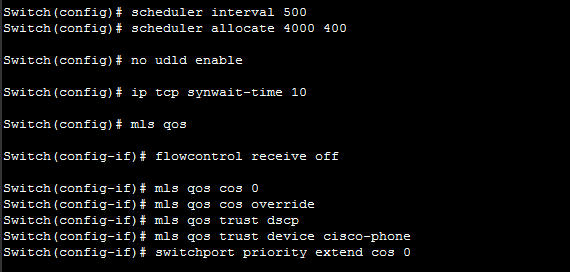
  • To prevent fast flooding attacks and to guarantee that even the lowest priority processes get some processor time use the scheduler interval command. The following Cisco Switch System Availability example sets the maximum time before running the lowest priority process to 500 milliseconds access.

Switch(config)# scheduler interval 500

Another way to guarantee processor time for processes is to use the scheduler allocate command. This command sets the interrupt time and the process time.

Cisco Switch System Availability

The following Cisco Switch System Availability example makes 10 percent of the processor available for process tasks, with an interrupt time of 4000 microseconds and a process time of 400 microseconds.

Switch(config)# scheduler allocate 4000 400

Read more

HSRP Tuning Example

HSRP Tuning Example

Today I will discuss about HSRP Tuning. As you see in the article “HSRP (Hot Standby Router Protocol)”, it is quite simple configure Hot Standby Router Protocol. [boxads]
Some cases require a custom configuration, using priority, track, preempt etc…and these are:

  • The standby preempt interface configuration command allows the router to become the active router when its priority is higher than all other HSRP-configured routers in this Hot Standby group. The configurations of both routers include this command so that each router can be the standby router for the other router. If you do not use the standby preempt command in the configuration for a router, that router cannot become the active router.
  • The standby priority interface configuration command sets the router’s HSRP priority (the default priority is 100).
  • The standby timers interface configuration command sets the interval in seconds between hello messages (called the hello time) to five seconds and sets the duration in seconds that a router waits before it declares the active router to be down (called the hold time) to eight seconds. (The defaults are three and 10 seconds, respectively.) If you decide to modify the default values, you must configure each router to use the same hello time and hold time.
  • The standby track command allows you to specify another interface on the router for the HSRP process to monitor in order to alter the HSRP priority for a given group. If the line protocol of the specified interface goes down, the HSRP priority is reduced. This means that another HSRP router with higher priority can become the active router if that router has standby preempt enabled.
  • The standby authentication interface configuration command establishes an authentication string whose value is an unencrypted eight-character string that is incorporated in each HSRP multicast message. This command is optional. If you choose to use it, each HSRP-configured router in the group should use the same string so that each router can authenticate the source of the HSRP messages that it receives.

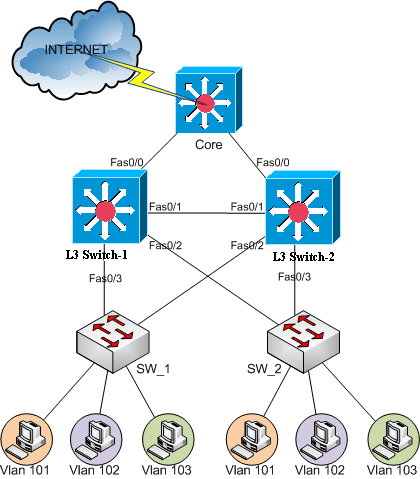
Suppose to have this physical configuration:

HSRP Tuning Example
HSRP Tuning Example

Read more