HSRP (Hot Standby Router Protocol)

HSRP (Hot Standby Router Protocol)

The HSRP (Hot Standby Router Protocol) is a Cisco proprietary first-hop redundancy protocol (FHRP) designed to allow for transparent fail-over of the first-hop IP router, and has been described in detail in RFC 2281.

[boxads]

HSRP provides high network availability by providing first-hop routing redundancy for IP hosts on Ethernet, Fiber Distributed Data Interface (FDDI), Bridge-Group Virtual Interface (BVI), LAN Emulation (LANE), or Token Ring networks configured with a default gateway IP address. HSRP is used in a group of routers for selecting an active router and a standby router. In a group of router interfaces, the active router is the router of choice for routing packets; the standby router is the router that takes over when the active router fails or when preset conditions are met. HSRP active and standby routers send hello messages to the multicast address 224.0.0.2 using UDP port 1985.

The virtual router is simply an IP and MAC address pair that end devices have configured as their default gateway. The active router processes all packets and frames sent to the virtual router address. The virtual router does not process physical frames and exists in software only. The active router physically forwards packets sent to the MAC address of the virtual router. The virtual router MAC address is a well know mac-address and it is 0000.0c07.acxx, where xx is the HSRP group member. For example, if the group is 20 the virtual MAC address is 0000.0c07.ac14 (remember that the number in the mac address is expressed in HEX!!!).

When the active router fails, the other HSRP routers stop seeing hello messages from the active router. So, the standby router will be the new active router and, if possible, a new standby router will be elected. Because the new active router assumes both the IP and MAC addresses of the virtual router, the end stations see no disruption in service. The end-user stations continue to send packets to the virtual router MAC address, and the new active router delivers the packets to the destination.

HSRP has 2 timers:

  • Hello interval time: Interval between successive HSRP hello messages from given router. Default is 3 seconds.
  • Hold interval time: Interval between the receipt of a hello message and the presumption that the sending router has failed. Default is 10 seconds.
HSRP (Hot Standby Router Protocol)

Read more

Configure Port Channel CISCO Switch

Configure Port Channel CISCO Switch:

EtherChannel bundles individual Ethernet links into a single logical link that provides bandwidth up to 1600 Mbps (Fast EtherChannel, full duplex) or 16 Gbps (Gigabit EtherChannel) between two Cisco Catalyst switches. All interfaces in each EtherChannel must be the same speed and duplex, and both ends of the channel must be configured as either a Layer 2 or Layer 3 interface. [boxads]

If one link within the EtherChannel bundle fails, traffic previously carried over the failed link is carried over the remaining links within the EtherChannel.

Link Aggregation protocols are:

  • IEEE standard Link Aggregation Protocol (LACP)
  • Cisco’s proprietary Port Aggregation Protocol (PAgP).

Read more

VRRP Tutorial (Virtual Router Redundancy Protocol)

VRRP Tutorial (Virtual Router Redundancy Protocol)

Today i will discuss about VRRP Tutorial, VRRP stands for Virtual Router Redundancy Protocol. It is a FHRP: First Hop Redundancy Protocol, which means they allow you to configure more than one physical router but it can still be seen as a single router.
First Hop means that any packet traveling out the network has its gateway as its first hop. It is protocol used for Gateway redundancy. [boxads]

–         It is similar to the HSRP protocol by Cisco
–         It is an open standard redundancy protocol i.e. can be used between different vendors
–         Was created by the IETF in 1999 and became industry standard
–         Faster than HSRP
–         The hello time is of 1 second
–         The Dead timer or Hold timer is of 3 seconds
–         The Active / Standby of HSRP are known as Master / Backup in VRRP
–         The Standby Group of HSRP is known as VRRP Group
–         If we use the real IP address then that router becomes the master
–         In case a Virtual IP address is used, the router with the highest priority is considered Master
–         VRRP messages are used to inform group members its status by the VRRP master
–         The virtual MAC address by default is 0000.5e00.01xx, where  xx means the hexadecimal group number
–         The Hellos in VRRP are sent to 224.0.0.18 multicast address
–         Default priority used is 100
–         The VRRP group number range is from 0 to 255
–         In VRRP the priorities range is from 1 to 254 ( 100 is default)
–         In VRRP the routers are configured to preempt the current master router by default if the priority is greater.
–         Advertisements in VRRP are sent to the multicast destination address 224.0.0.18 (VRRP), using IP protocol 112.
–         In VRRP , router Role, we can have one Master router and one or more Backup routers
–         By default preempt is on in VRRP which means that if a router that was master goes down, it loses master-ship but if it comes up again, it becomes master without any config changes or intervention.
–          Does not support IPv6
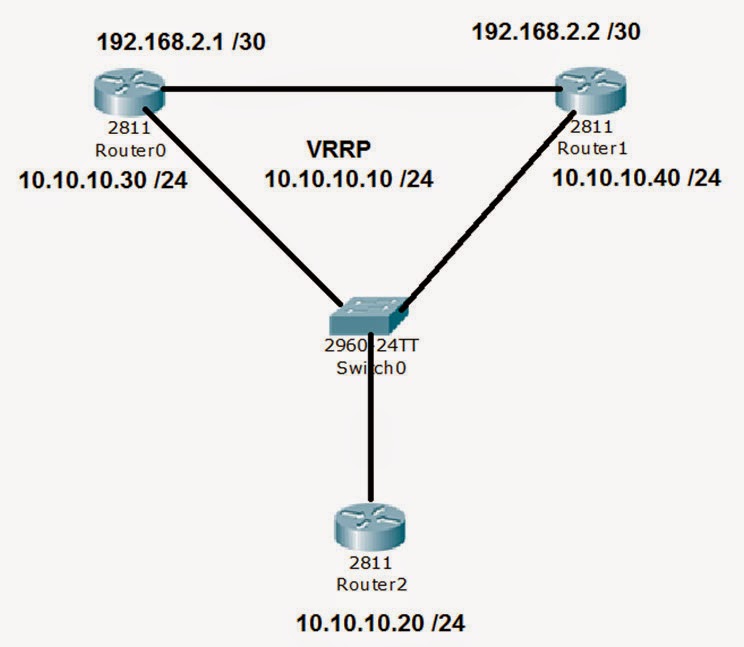
Consider the following diagram, we have Router0 and Router1 configured with the VRRP configuration.

VRRP
VRRP

The Virtual IP (VIP) to be used is 10.10.10.10

Read more

Spanning Tree Protocol Security

Spanning Tree Protocol Security

Today I will discuss about Spanning Tree Protocol Security issue. Spanning Tree Protocol (STP), also known as 802.1d, is a Layer 2 protocol designed to prevent loops within switched networks. Typically, STP goes through a number of states (e.g., block, listen, learn, and forward) before a port is able to pass user traffic. [boxads]

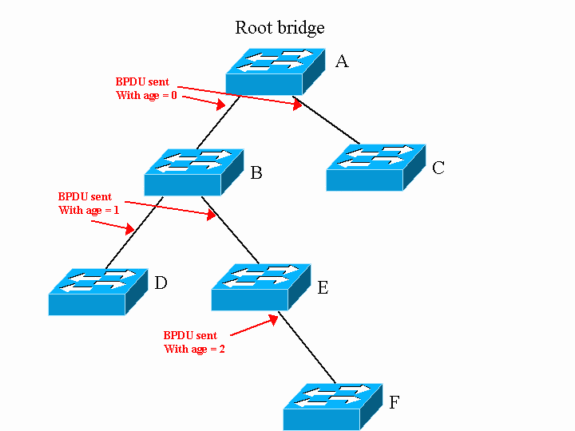
A vulnerability associated with STP is that a system within the network can actively modify the STP topology. There is no authentication that would prevent such an action. The bridge ID, a combination of a two-byte priority and a six-byte MAC address, determines the root bridge within a network.

  • 1. STP Portfast Bridge Protocol Data Unit (BPDU) Guard

The STP Portfast BPDU Guard allows network administrators to enforce the STP topology on ports enabled with Portfast. Systems attached to ports with the Portfast BPDU Guard enabled will not be allowed to modify the STP topology. Upon reception of a BPDU message, the port is disabled and stops passing all network traffic.

This feature can be enabled both globally and individually for ports configured with Portfast. By default, STP BPDU guard is disabled. The following Spanning Tree Protocol Security command is used to globally enable this feature on a Cisco 3550 series switch.

Switch(config)# spanning-tree portfast bpduguard default

Use the following command to verify the configuration.

Switch> show spanning-tree summary totals

To enable this feature at the interface level on a Cisco 3550 series switch, use the following command.

Switch(config-if)# spanning-tree bpduguard enable

Read more

Spanning Tree Protocol Overview

Spanning Tree Protocol Overview

Today I will discuss about Spanning Tree Protocol. STP prevents a network from frame looping by putting some interfaces in forwarding state & some interfaces in blocking state. [boxads]

Whenever two or more switches are connected with each other for redundancy purpose loop can occur. STP Protocol is used to prevent the loop. Spanning Tree Protocol is layer 2 Protocol & by default it is enabled on switches.

If we don’t use STP, these problems will occur on the network:

 (i) Broadcast Storms
(ii) High Processor Utilization
(iii) Mac Table instability
(iv) Multiple Frame Transmission
STP Tasks:

1. Elect Root Bridge
2. Elect Designated Port
3. Elect Root Port

Spanning Tree Protocol

Read more

VLAN Mapping Cisco Switch Configuration

VLAN Mapping Cisco Switch Configuration:

Today i will show you how to configure VLAN mapping cisco switch.

[boxads]

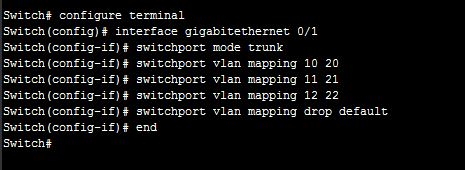
Here we Map Vlan 10 to VLAN 20 in Gigabit Ethernet port 0/1:

Switch# configure terminal
Switch(config)# interface gigabitethernet 0/1
Switch(config-if)# switchport mode trunk
Switch(config-if)# switchport vlan mapping 10 20
Switch(config-if)# switchport vlan mapping 11 21
Switch(config-if)# switchport vlan mapping 12 22
Switch(config-if)# switchport vlan mapping drop default
Switch(config-if)# end
Switch#

So all incoming Vlan 10 of gi0/1 interface is Converted/Translated to Vlan 20. same way Vlan 11, 12 mapping with 21, 22.

VLAN mapping cisco switch

How to verify the configuration:

Switch# show vlan mapping
or
Switch# show interface gigabitethernet 0/1 vlan mapping

State: enabled

Original VLAN    Translated VLAN
—————-    ——————–

10                                   20

Read more