Huawei Switch Configuration Tutorial Basic

Huawei Switch Configuration Tutorial:

Today i will discuss how to configure a new huawei switch, so lets go our Huawei Switch Configuration Tutorial part…………[boxads]

Procedure:

  • Step 1: Connect the COM port on the PC and the console port on the switch by a cable.
  • Step 2: Power on all devices to perform a self-check.
  • Step 3: Run the terminal emulation program on the PC, setting the communication parameters as follows:
    -Baud rate: 9600 bps
    -Data bit: 8
    -Stop bit: 1
    -Parity: none
    -Flow control: none

# Set system name / Host name:

<Quidway> System-View
[Quidway] sysname Switch-1
[Switch-1]quit

Read more

Layer 2 Switching process

Layer 2 Switching process

Today I will discuss about Layer 2 Switching process. A Process of using the MAC address on LAN is called Layer 2 Switching.

Layer 2 Switching is the process of using hardware address of devices on a LAN to segment a network. Switching breaks up large collision domains into smaller ones and that a collision domain is a network segment with two or more devices sharing the same bandwidth. [boxads]

Ethernet is a LAN technology based on the IEEE 802.3 standard. It provides a shared medium to transfer the data.

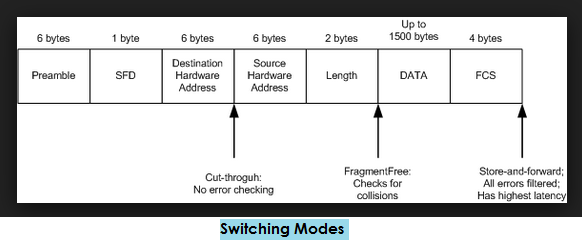
There are three Switching Modes:

  1. Cut through (Fast Forward)- When in this mode, the switch only waits for the destination hardware address to be received before it looks up the destination address in the MAC filter table. Cisco sometimes calls this the fast forward method.
  2. Fragment Free (Modified cut through)- This is the default mode for the catalyst 1900 switch, and it’s sometimes referred to as modified cut through. In fragment free mode, the switch checks the first 64 bytes of a frame before forwarding it for fragmentation, thus guarding against forwarding runts, which are caused by collisions.
  3. Store and forward- In this mode the complete data frame is received on the switch’s buffer, a CRC is run, and if the CRC passes, the switch looks up the destination address in the MAC filter table.
Layer 2 Switching process

Read more

OSPF LSA Types with Example

OSPF LSA Types:

[boxads] There are different types of link-state advertisements (LSAs) that would be used for Open Shortest Path First (OSPF). This article contains List of OSPF LSA types with a short description. LSAs build up the OSPF link state database (LSDB), and they are exchanged between OSPF enabled nodes. Bellow short description of OSPF LSA types.

  • LSA Type 1 (Router LSA): LAS type 1 are generated by every router of an OSPF area. They are flooded to all other routers only inside an area of origin & directly connected router. In the link-state ID you will find the originating router’s ID.
  • LSA Type 2 (Network LSA): LSA type 2 are generated by DR  and flooded into the area of origin. The link-state ID will be the router ID of the DR.

Read more

OSPF Message Types / Packet Types

OSPF Message Types:

[boxads] There are several types of message are passes through OSPF network for communication each other. that OSPF Message Types are given bellow:

1. Hello : These messages are used to establish neighbor ship and serve as keepalives among other things. They are also used to elect the Designated Router (DR) and Backup Designated Router (BDR) on multiaccess networks (like Ethernet or Frame Relay).

Sent on 224.0.0.5 and 224.0.0.6

Contains the following in the packet;

  • RID of interface
  • Authentication
  • Hello Dead Timers
  • Area ID
  • Nieghbor List (If not a nieghbor, sends more info)
  • Designated Router IP
  • Backup DR IP
  • Priority of Interfaces

Hello interval: indicates how often it sends Hello packets. By default, OSPF routers send Hello packets every 10 seconds on multiaccess and point-to-point segments and every 30 seconds on non-broadcast multiaccess (NBMA) segments (like Frame Relay, X.25, ATM).

[adsense]

Dead interval: number of seconds this router should wait between receiving hello packets from a neighbor before declaring the adjacency to that neighbor down.

2. Database Descriptor (DBD or DD) : These messages send summaries of a router’s known LSAs to a new neighbor.  Receiving routers can use this information to compare to their database and ask for more details if needed.

Read more

OSPF Area Types With Example

OSPF Area Types:

[bodyads] OSPF is a widely used protocol in service provider environments. Now a days the majority of the network setups use this protocol. OSPF is well suited for multi-vendor environments. OSPF allows 5 different area types, which provides flexibility, fast convergence and scalability. OSPF area types are:

  1. Backbone/ Non-backbone
  2. Stub Area
  3. Totally Stubby Area
  4. Not-So-Stubby Area (NSSA)
  5. Totally Not-So-Stubby Area (NSSA)
ospf area types with LSA

Backbone area:

The backbone area is the core of an OSPF network (also this area known as area 0 or area 0.0.0.0). All other areas are connected to backbone area, and inter-area routing happens via routers connected to the backbone area and to their own associated areas. The backbone area is responsible for distributing routing information between non-backbone areas. The backbone must be contiguous, but it does not need to be physically contiguous; backbone connectivity can be established and maintained through the configuration of virtual links.

Read more

Huawei Switch Factory Reset Command

Huawei Switch Factory Reset Command

Today i will discuss how to Erase/Remove all current configuration Huawei Switch or Huawei Switch Factory Reset Command. So at first login your switch and run the reset saved-configuration command to Erase the configuration file for the next startup and then restart the device. If you are prompted to save the configuration, select N indicating that the device will not save the current configuration. [boxads]

Huawei Switch Factory Reset Example:

<JibonBima_Tower_2_9>reset saved-configuration
The action will delete the saved configuration in the device.

The configuration will be erased to reconfigure. Continue? [Y/N]:y
Warning: Now clearing the configuration in the device.
Jan  1 2008 01:51:41-05:13 JibonBima_Tower_2_9 %%01CFM/4/RST_CFG(l)[0]:The user chose Y when deciding whether to reset the saved configuration.
Info: Succeeded in clearing the configuration in the device.

<JibonBima_Tower_2_9>reboot
Info: The system is now comparing the configuration, please wait.
Warning: All the configuration will be saved to the configuration file for the next startup:, Continue?[Y/N]:n
System will reboot! Continue?[Y/N]:y
Jan  1 2008 01:52:30-05:13 JibonBima_Tower_2_9 %%01CMD/4/REBOOT(l)[1]:The user chose Y when deciding whether to reboot the system.
Info: system is rebooting ,please wait…
Jan  1 2008 01:52:30-05:13 JibonBima_Tower_2_9 %%01SRM/4/MSTRSCURST(l)[2]:Master SCU is reset.
Jan  1 2008 01:52:30-05:13 JibonBima_Tower_2_9 %%01SRM/4/ResetReason(l)[3]: Board reset by VRP command or net manager .
System reboot at 01:52:31

Read more