Removing Private AS Numbers in BGP

Removing Private AS Numbers in BGP

Autonomous System (AS) is identified by a number in the range 1 to 65535. AS numbers in the range 1 to 64511 are assigned by InterNIC. These are reserved and globally unique AS numbers. AS numbers in the range 64512 to 65535 are known as private AS numbers, and like private IP addresses, these can be used to address ASs when a globally unique AS number is not necessary. It is important to ensure that the private AS numbers are not introduced into the global BGP table through the AS-Path attribute. To removing private AS numbers in BGP the AS-Path attribute in outbound routing updates, issue the neighbor remove-private-as command in router configuration mode. [boxads]

Most companies have acquired their own AS number and also some have implemented Private AS numbers connected to their Public AS network. They might have created a private AS number per region. There are others also who run BGP and are using private AS connected to their ISP using PA (Provider Allocated) Public IP addresses. No matter, how its implemented, announcing the private AS number you are using to the internet is a big NO, NO. ISP’s should filter these private AS and not advertise them out to the internet.

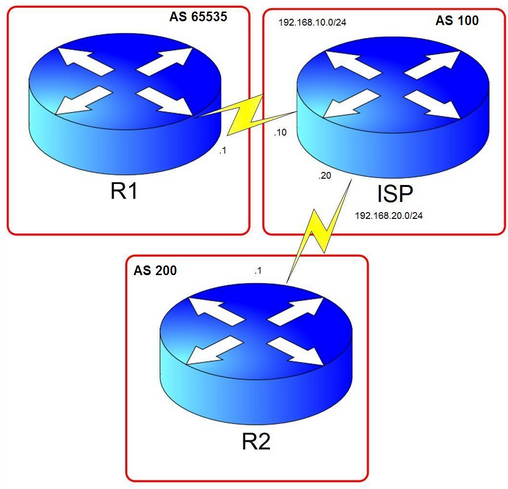
Consider the diagram below. Let’s say R1 is in Company A and is connected to its ISP using a private AS number 65535. The task we need to complete here is to filter any private AS to be announced to R2 so that R2 will only see the AS number of the ISP.
Removing Private AS Numbers in BGP

Firstly, I have done configuring the IP addresses indicated in the diagram. Created Loopback0 and Loopback10 in R1 and ISP and advertised them in BGP. Of course, all routers have BGP established. I have also announced networks 123.123.123.123/32 and 12.12.12.12/32 in the ISP router.
Read more

BGP as-override and allowas-in

BGP as-override and allowas-in:

Today i will discuss basic difference between as-override and allowas-in command & which are configure which router. [boxads]

These two functions are pretty similar, just with subtle differences. They can be used in an environment where a customer is using one AS number for many sites that are connected to an ISP. This is shown in the example below.

bgp as-override and allowas-in

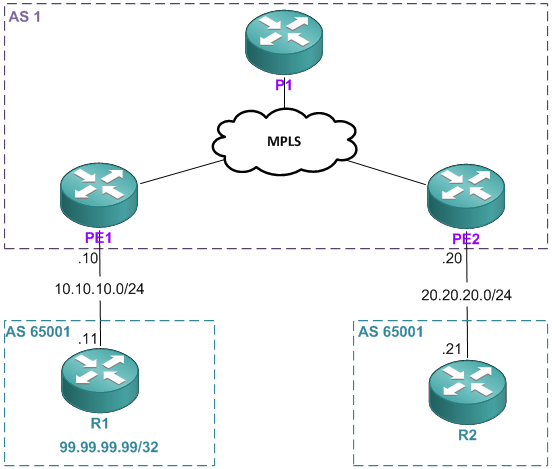
You can see that AS 65001 connects to the ISP at two locations. So when R2 receives the prefix 99.99.99.99/32, he will see that the AS path is via 1, 65001. Because of the loop prevention mechanism, R2 will have to reject this prefix because it can see its own AS in the AS_PATH attribute. I’ll demonstrate that now. But first, I’m going to post the full configurations because this can be pretty confusing to configure.

Read more

BGP AS path Prepending outbound routes

BGP AS path Prepending outbound routes

BGP AS path Prepending outbound routes is rich in features that you can have more control than on what IGP’s offer however, you can only have control on how the traffic leaves your autonomous system and can’t really control how other autonomous systems reach you. Other AS’es might have BGP policies that route the traffic in a way you don’t intend it to go. You don’t have control over those because, its their autonomous systems after all. However, there are work arounds which allow, an autonomous system affect the other autonomous systems, one of this is called BGP AS-path prepending. It is basically adding additional AS-paths by repeating your own AS number.[boxads]

Consider the diagram below. By looking at the diagram, if you are familiar with BGP, the AS-path the networks from R4 will take towards R1 will be AS4, AS3 and then AS1. If all the attributes are set to the default values, most likely the AS-path attribute will determine which path to take. The more desirable path in this scenario is AS4, AS3, AS2 and then AS1 for the reason that there is a 100mbps link connecting AS1 and AS2 which makes traffic forwarding more efficient. But remember, unlike IGP’s, BGP doesn’t take to account the bandwidth.

In this scenario we are in AS1 and we make AS2 the more desirable path for AS4 to reach us using AS-path prepending.

BGP AS path Prepending outbound routes

Checking on R4 we will see how it gets to R1.

Read more

BGP Local-Preference Attribute Cisco Router

BGP Local-Preference Attribute Cisco Router

BGP Local-Preference Attribute Cisco is another BGP attribute that’s important in the decision process for multiple redundant paths. In fact, if you’re concerned about the order of things, you should know that on Cisco routers, the “weight” attribute is checked first, so that if a given neighbor has a higher weight, the local preference isn’t even checked. However, it’s still quite important because it is an important attribute on all routers, and it affects the BGP routing process in much the same way. [boxads]

Local Preference is one of the ways to alter the path taken by one AS to reach another AS. The difference between Local Preference and Weight is that Weight is just locally significant in the router while Local Preference is what I call “Local AS significant”. What I mean by that is that Local Preference is being propagated Intra AS but not outside the AS.

  • Local preference is to influence your own AS how to get or exit to another AS.
  • The higher the local preference, the more preferred.

In this lab, local preference will be configured and will be using route map for more flexibility. Check the diagram below for details.

BGP Local-Preference Attribute Cisco Router

R1, R2 and R3 belongs to AS 123. R4 is in AS4 and is advertising 4.4.4.4/32, 44.44.44.44/32 and 144.144.144.144/32
subnets.We need to set all routes learned from R3 to have local preference value of 300. After which, configure a
route-map that will assign a local preference of 500 in R2 for the network 144.144.144.144/32.

Read more

Change BGP Weight Attribute Cisco Router by Route Maps

Change BGP Weight Attribute Cisco Router by Route Maps

Change BGP Weight Attribute Cisco router by Route Maps. Weight attribute is used by BGP to break the tie when there are more routes to the same network. Route with the highest weight is preferred. Weight attribute is a Cisco feature, it has local meaning and it is not transmitted to other routers. [boxads]

In this example we will discuss about how to change BGP weight attribute cisco router by Route Maps.

Change BGP Weight Attribute Cisco Router by Route Maps

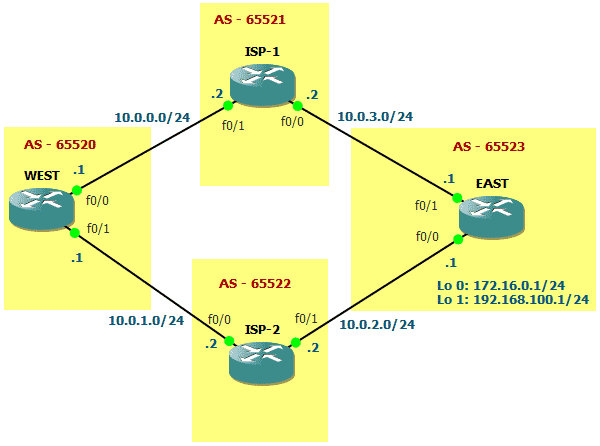
In the picture you see that WEST router in AS 65520 receives the routes advertised by EAST router in AS 65523 (172.16.0.0/24 and 192.168.100.0/24) over ISP-1 and ISP-2 routers. BGP will choose to reach those routes over ISP-1 or ISP-2. Let’s assume that all configurations are already made and all settings are left default. If so, let’s check bgp table of WEST router:

Read more

BGP Weight Attribute Configure

BGP Weight Attribute Configure

BGP Weight Attribute is a Cisco Proprietary attribute that influences a router how to reach a certain prefix. The difference between Local Preference and Weight is that the former is propagated within an AS and the latter is router locally significant. Weight can be used if there is one router connected to two or more AS’s or just to just one with two or more eBGP peers. Now, lets configure weight and later use a route-map for more complex use of weight. [boxads]

  • Weight is a Cisco Proprietary attribute for BGP that is “locally significant.”
  • Local Preference is a Well-known Discretionary attribute, Weight doesn’t belong to any category.
  • Default Weight for locally originated routes is 32768. Zero is the default for other routes.
  • Weight is not propagated to other routers within the AS.

In this lab, BGP Weight Attribute will be configured and will be using route map for more flexibility. Check the diagram below for details.

BGP Weight Attribute Cisco Proprietary attribute

Read more